
MFS Components : Automate Stacker cranes, PLC integration, and real-time telegram flows with communication point and communication channel in S/4HANA.
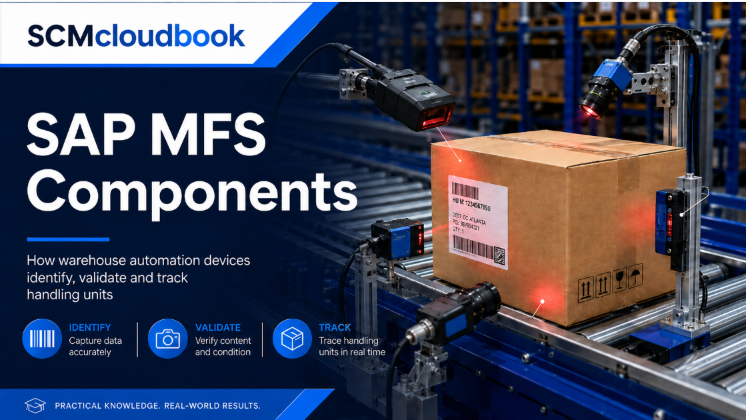
Material Flow System (MFS) in SAP EWM is the direct integration layer between EWM and Programmable Logic Controllers (PLCs) that runs fully automated warehouses. Adopted by automotive, pharma, retail DC, and e-commerce fulfilment giants for ASRS, conveyors, and cranes.
Covered in this SAP EWM L3 (level-3) module:
- MFS fundamentals and EWM vs PLC roles
- Direct TCP/IP telegram communication (post S/4HANA)
- Communication channels, points, and resources
- ASCII telegram structures without middleware
- Emulator-based UAT for automated warehouses
MFS configuration and Integration setup
MFS configuration in SAP EWM defines how the warehouse talks to PLCs in real time. Every stacker crane, conveyor, and diversion sensor is mapped through communication channels and communication points to keep automated flows stable and fast.
You will configure in this SAP EWM Advance (level-3) learning : SAP EWM L3 – Consulting
- PLC setup with TCP/IP and proprietary layers
- Telegram retries, timeouts, and sequence numbers
- Communication points, ID points, and capacity checks
- Scanner checkbox to bypass FIFO for broken HUs
- Log checkbox for MFS troubleshooting
Queue, Resource, and Storage Control in MFS
MFS queues and resources decide how physical equipment executes warehouse tasks. Getting queue-to-PLC mapping right is the difference between a smooth automated warehouse and a shop-floor bottleneck.
You will configure in this L3 (level-3) training:
- Queue determination by bin access type and activity
- One PLC, multiple queues rule (never the reverse)
- Stacker crane setup as MFS resource
- One-step vs two-step commissioning
- Layout Oriented Storage Control (LOSC) path design
- Storage type roles H (intermediate) and J (final)
MFS Execution, Telegrams, and ABAP Layer
MFS execution is powered by Send programs, Receive programs, and periodic jobs that push and pull telegrams between SAP EWM and PLCs. Understanding this ABAP layer is what separates a functional consultant from a true MFS architect.
You will master:
- Send, Receive, and periodic job architecture
- Six standard MFS actions and triggered function modules
- Telegram logging, sequence checks, and MFS tables
- Communication point dependencies and pre-discharge checks
- BAdI enhancements for custom telegram structures
- Generate Application Data after config changes
MFS Exception Handling and Project Considerations
MFS exception handling is where automated warehouses either recover gracefully or grind to a halt. Real projects fail on stakeholder coordination, telegram alignment, and performance sizing — not on core config.
Covered in this closing SAP EWM L3 (level-3) module:
- Exception triggers: EWM (A1) vs PLC (Z step)
- Business contexts MF1–MF6, focus on MF4 and MF5
- Mapping PLC error codes to EWM exception codes
- Clarification bins for blocked HUs
- SLG1 logs and telegram monitor troubleshooting
- Server sizing, network latency, and stress testing
Components and Resources in SAP EWM MFS and how the components connect to each other ?
A handling unit enters at a Communication Point → a Scanner or sensor identifies it → the PLC evaluates the signal and decides the next action → the PLC sends a telegram to SAP EWM → EWM validates against the Warehouse Task and returns a destination → the PLC drives the assigned Resource (crane, conveyor, or TCAR) to execute → a downstream sensor confirms completion → the cycle repeats at the next Communication Point.
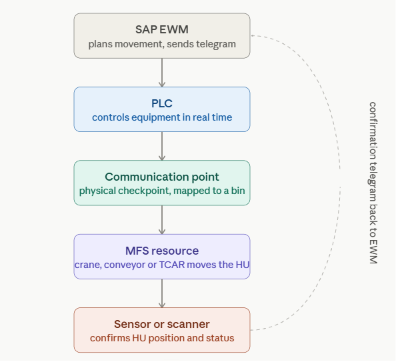
SAP EWM Material Flow System connects SAP EWM with warehouse automation equipment. SAP EWM plans the material movement, while PLCs and automated resources physically execute it.
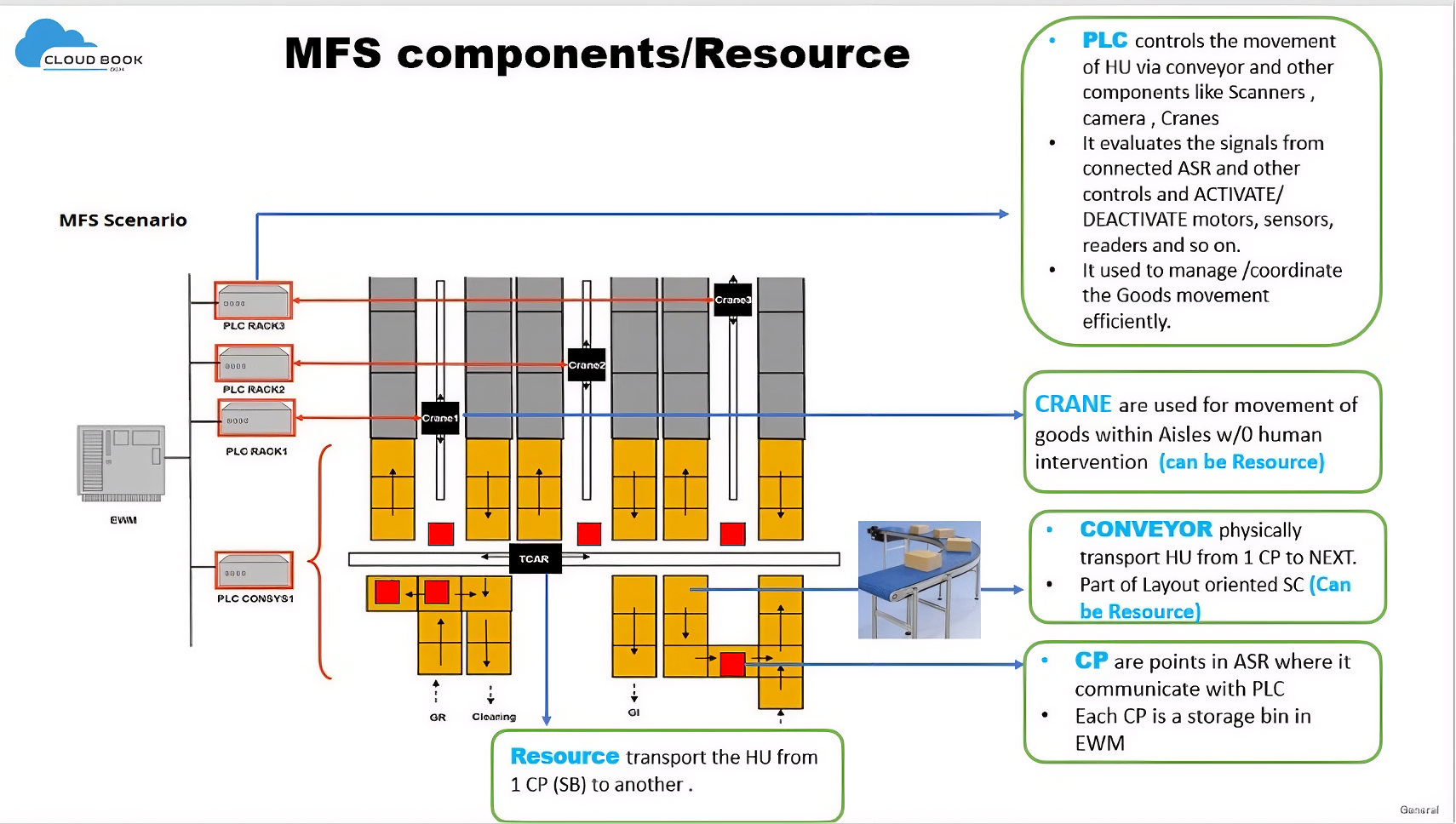
1. Programmable Logic Controller
A PLC is an industrial controller that manages the real-time operation of automated warehouse equipment.
The diagram shows separate PLCs for:
- Crane 1
- Crane 2
- Crane 3
- Conveyor system
- Transfer-car or cross-conveyor area
PLC responsibilities
The PLC:
- Receives telegrams from SAP EWM MFS
- Controls conveyor motors
- Activates and deactivates sensors
- Controls scanners and readers
- Controls crane movements
- Controls transfer-car positioning
- Checks equipment interlocks
- Prevents physical collisions
- Reports equipment status and errors
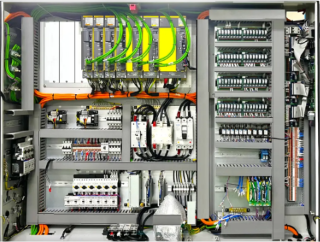
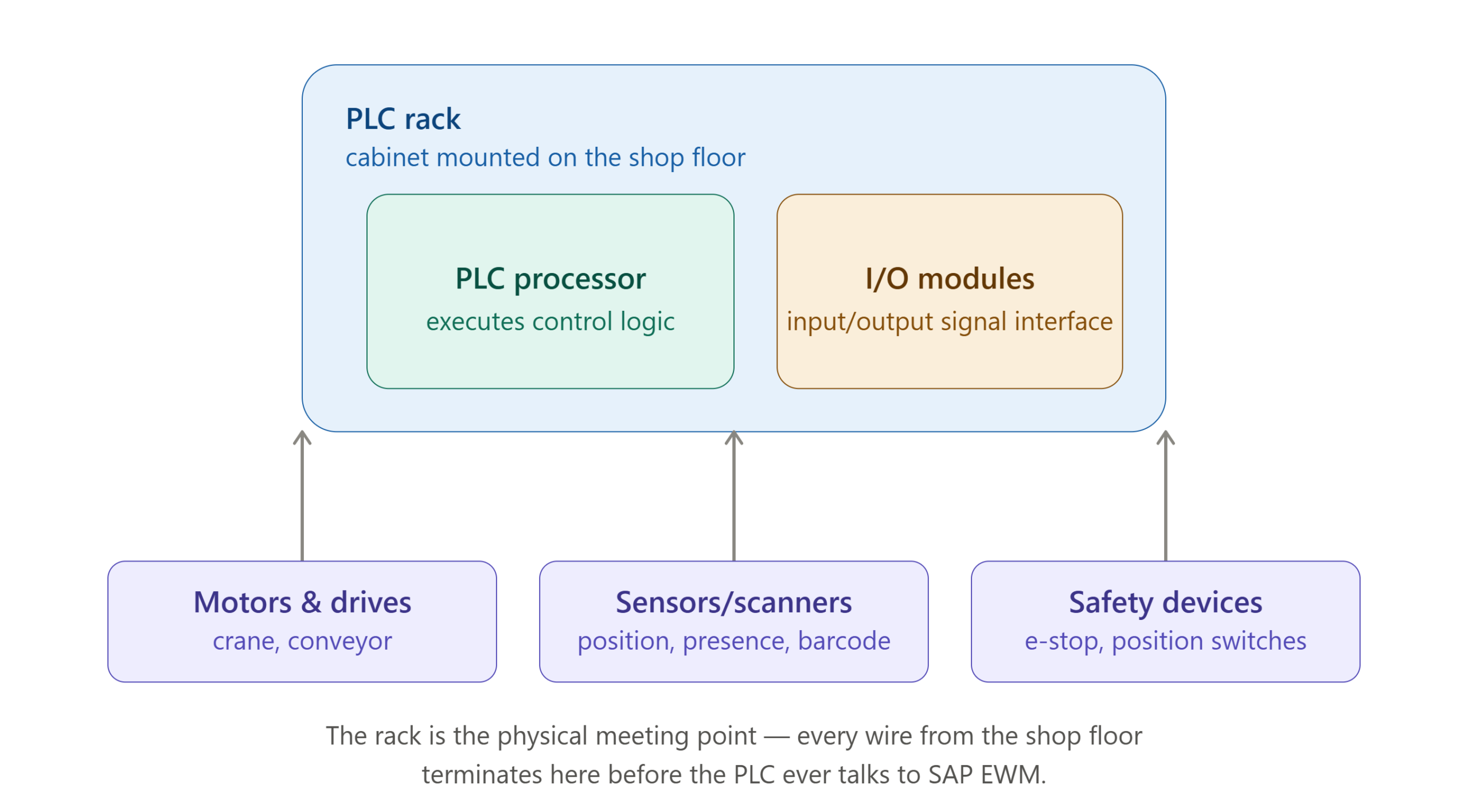
2. PLC Rack
A PLC rack is the physical cabinet or hardware assembly containing the PLC processor and input/output modules.
The rack connects the PLC with:
- Motors
- Sensors
- Scanners
- Crane drives
- Conveyor drives
- Safety devices
- Position switches
- Emergency-stop circuits
3. MFS Resource
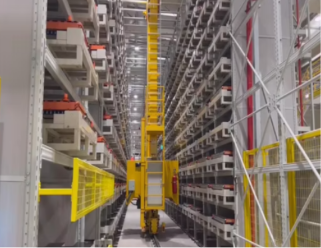
An MFS resource represents automated equipment or an equipment group that executes warehouse movements.
A resource transports a Handling Unit from one Communication Point to another.
A resource can represent:
- Stacker crane
- Conveyor section
- Transfer car
- Shuttle
- Lift
- Monorail
- Automated guided vehicle
- Robotic handling station
4. Crane
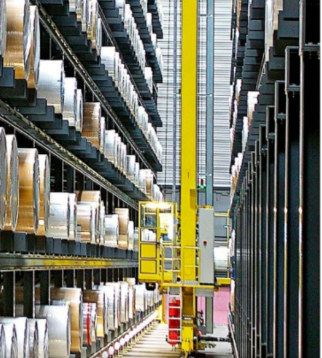
A crane, normally a stacker crane, moves Handling Units inside an automated storage aisle.
It can move in three directions:
Horizontal movement
The crane travels along the aisle to the required rack column.
Vertical movement
The crane platform moves upward or downward to the required storage level.
Load-handling movement
A telescopic fork or load-handling device extends into the rack to place or retrieve the Handling Unit.
Crane responsibilities
The crane:
- Picks up the HU from the aisle feeder
- Moves to the required rack position
- Deposits the HU in the storage bin
- Retrieves the HU during outbound processing
- Reports successful or failed movement to the PLC
5. Conveyor
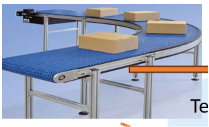
A conveyor physically transports Handling Units between warehouse locations.
It may consist of:
- Rollers
- Belts
- Motors
- Sensors
- Stop gates
- Diverters
- Turntables
- Scanners
- Weighing stations
Conveyor responsibilities
The conveyor:
- Moves the HU from one Communication Point to the next
- Maintains spacing between HUs
- Stops the HU at scanner or validation points
- Routes the HU toward the correct aisle
- Transfers the HU to a crane, lift or transfer car
- Reports the current HU position through sensors
A conveyor section can also be represented as an MFS resource, particularly where the section performs a defined movement between two Communication Points.
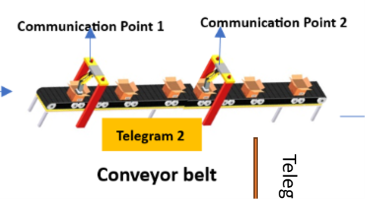
6. Communication Point
A Communication Point, or CP, represents an important physical position in the automated warehouse.
Typical Communication Points include:
- Scanner station
- Conveyor junction
- Aisle entry point
- Transfer-car handover point
- Crane pickup point
- Lift entry or exit
- Clarification point
- Goods Receipt or Goods Issue interface
Communication Point in SAP EWM
Every Communication Point is normally assigned to a storage bin in SAP EWM.
This allows MFS to map a physical machine position to a logical warehouse location.
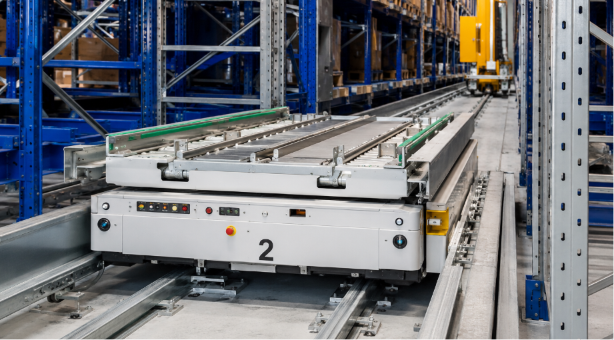
7. TCAR or Transfer Car
The TCAR is a transfer car that moves Handling Units horizontally between conveyor lines and multiple storage aisles.
Its main function is cross-aisle transportation.
TCAR movement
The transfer car:
- Receives the HU from an inbound conveyor.
- Moves horizontally along a rail or track.
- Stops in front of the required aisle.
- Transfers the HU to the aisle feeder.
- Returns for the next task.
 8. Scanner
A scanner reads the barcode, SSCC or Handling Unit number.
It is generally installed at:
- Goods Receipt entry
- Conveyor entry
- Identification point
- Aisle entry
- Goods Issue point
- Clarification station
Scanner process
- The HU passes through the scanner beam.
- The scanner reads the HU number.
- The PLC receives the scanned information.
- The PLC sends a telegram to MFS.
- MFS validates the HU and its Warehouse Task.
- MFS determines the next destination.
- The PLC releases the HU for movement.
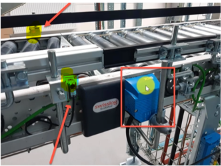
9. Sensors
Sensors detect the physical status of the HU and equipment.
Examples include:
- Presence sensor
- Position sensor
- Photoelectric sensor
- Weight sensor
- Height sensor
- Dimension sensor
- Fork-position sensor
- Motor-status sensor
- Safety sensor
Sensors provide signals to the PLC.
The PLC evaluates these signals and decides whether to:
- Start a motor
- Stop a conveyor
- Open a gate
- Move the crane
- Release the next HU
- Trigger an error
- Send a telegram to MFS

10. Camera and Barcode Reader
Cameras and industrial readers may be used for:
- Barcode reading
- OCR recognition
- Label verification
- Damage detection
- Dimension checking
- Pallet-profile checking
- Orientation validation
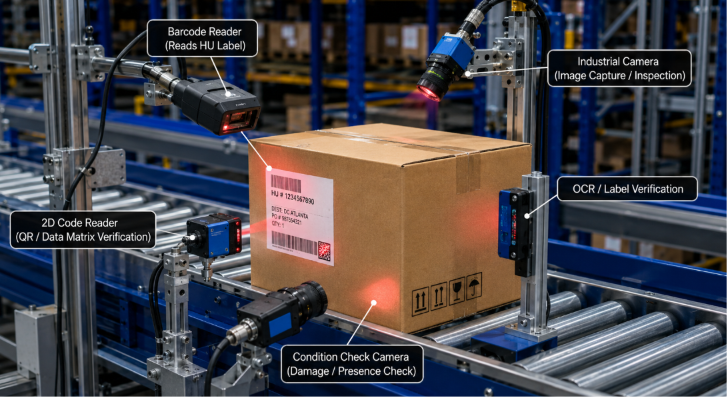
The reader sends the result to the PLC, and the PLC forwards the relevant information to SAP MFS.
When validation fails, the HU may be stopped or routed to a clarification area.
Frequently Asked Questions — SAP EWM Material Flow System (MFS)
1. What is Material Flow System (MFS) in SAP EWM?
Material Flow System (MFS) is the direct integration layer within SAP EWM that connects the warehouse management system with Programmable Logic Controllers (PLCs).
It is used to operate automated warehouses containing equipment such as:
- Automated Storage and Retrieval Systems (ASRS)
- Conveyors
- Stacker cranes
- Transfer cars
- Automated handling systems
MFS allows SAP EWM to communicate directly with PLCs without requiring additional middleware.
2. What is the difference between SAP EWM and PLC in an MFS setup?
SAP EWM acts as the planning and decision-making system. It determines where handling units should move based on warehouse processes, storage strategies, and warehouse tasks.
The PLC acts as the execution system. It physically controls automated equipment such as conveyors, cranes, motors, sensors, and transfer cars.
In simple terms, SAP EWM decides what should happen, while the PLC controls how the physical movement happens.
3. How does SAP EWM communicate with PLCs in MFS?
From SAP EWM 9.4 and S/4HANA onwards, MFS supports direct communication between SAP EWM and PLCs using TCP/IP and ASCII-based telegram structures.
This direct communication removes the need for middleware and enables real-time exchange of:
- Warehouse task information
- Handling unit movements
- Equipment status
- Confirmation messages
- Error and exception messages
4. What are Communication Channels and Communication Points in MFS?
A Communication Channel is the connection or transmission medium between SAP EWM and a PLC.
It contains communication-related settings such as:
- Telegram retries
- Response timeouts
- Sequence numbers
- Connection parameters
- Message acknowledgement settings
A Communication Point represents a physical location in the automated warehouse, usually connected to a sensor or equipment checkpoint.
Communication points are mapped to storage bins and are used to track material movements and trigger routing decisions, such as ID-point destination determination.
5. Can one PLC handle multiple queues in SAP EWM MFS?
Yes. One PLC can be assigned to and handle multiple queues in SAP EWM MFS.
However, one queue cannot be assigned to multiple PLCs. Every queue must be uniquely assigned to a single PLC to avoid operational conflicts on the automated warehouse floor.
6. How is exception handling performed in SAP EWM MFS?
MFS exceptions can be triggered by either SAP EWM or the PLC.
SAP EWM normally triggers exceptions through an outbound A1 step, while the PLC can trigger exceptions through an inbound Z step.
MFS exceptions are grouped into business contexts ranging from MF1 to MF6. The commonly used contexts include:
- MF4: Resource-related exceptions
- MF5: Communication point-related exceptions
PLC error codes can be mapped to internal SAP EWM exception codes. When a handling unit cannot continue through the automated process, it may be blocked and routed to a clarification bin for manual investigation.
7. What tools are used to troubleshoot SAP EWM MFS issues?
The following tools are commonly used for MFS troubleshooting:
SLG1 Application Log
SLG1 is used to analyse system logs, telegram processing details, errors, and communication events in a tabular format.
Telegram Monitor
The Telegram Monitor is used to review incoming and outgoing telegrams, message sequences, acknowledgements, and communication errors between SAP EWM and the PLC.
Location Configuration
Location or LOC configuration helps identify process bottlenecks and routing problems, including:
- Storage bin occupancy conflicts
- Incompatible handling unit types
- Communication point issues
- Invalid routing decisions
- Blocked warehouse tasks
8. Can MFS be implemented after an SAP EWM go-live?
Yes. SAP EWM MFS can be introduced after the initial EWM go-live.
However, the physical warehouse infrastructure must already be available or planned, including:
- PLCs
- Sensors
- Conveyors
- Cranes
- Automated equipment
- Network connectivity
The equipment and PLC systems must also support the required communication protocol and ASCII-based telegram structure.
9. Is MFS the right technology for every automated warehouse?
No. MFS is most suitable for high-speed and latency-sensitive warehouse automation, including:
- ASRS warehouses
- High-bay storage systems
- Stacker cranes
- Conveyor systems
- Automated transfer systems
For slower or less time-sensitive processes such as shuttle systems, pick-by-light, or other specialised automation solutions, alternative integration technologies such as IDocs, APIs, or web services may sometimes be more appropriate.
The integration method should be selected based on automation speed, response-time requirements, equipment capability, and warehouse process complexity.
10. Who should take SAP EWM MFS L3 Super Advanced Training?
SAP EWM MFS L3 Super Advanced Training is suitable for:
- SAP EWM consultants
- Warehouse automation consultants
- SAP solution architects
- SAP technical consultants
- EWM developers
- Project managers
- Corporate training decision-makers
The training is especially useful for professionals working on SAP S/4HANA automated warehouse projects involving ASRS, PLCs, conveyors, cranes, sensors, and other material-handling equipment.
Conclusion
SAP EWM Material Flow System (MFS) enables direct communication between SAP EWM and automated warehouse equipment such as PLCs, conveyors, cranes, stacker cranes, and Automated Storage and Retrieval Systems (ASRS). It improves warehouse automation, reduces manual intervention, and ensures accurate, real-time execution of material movements.
Mastering SAP EWM MFS is essential for consultants working on automated warehouses and advanced SAP S/4HANA EWM implementation projects.
To build expertise in advanced SAP EWM topics, SCM-Cloudbook offers practical training on MFS, ASR, Cartonization Planning, Dock Appointment Scheduling, SAP EWM ABAP, MES Integration, ASRS, and Warehouse Automation, with a strong focus on real-world implementation scenarios and hands-on learning.
Connect with us for SAP EWM and TM training enquiries:
SAP EWM L3 – Consulting & Training
WhatsApp: http://wa.link/04d8tw
Learn more on MFS and other automation :SAP EWM L3 – Consulting
SAP TM –Transport Management – Consulting
LinkedIn: (7) SCM-Cloudbook: Company Page Admin | LinkedIn