
SAP S/4 HANA EWM QI process flow using Inspection type 17 and 01

The purpose of this blog is to understand the general configuration and process steps required to manually set up quality management processes in embedded EWM in S/4HANA 1909 and higher releases. It is assumed that an EWM warehouse number and basic EWM processes e.g. inbound process are set up in the system.
The Quality Inspection (QI) process in SAP S/4HANA Embedded Extended Warehouse Management (EWM) system is designed to ensure that goods received and managed in the warehouse meet predefined quality standards.

Configuration
Specify Work Center Layout –
SCM Extended Warehouse Management-Extended Warehouse Management-Master Data-Work Center-Specify Work Center Layout

Define Work Center –
SCM Extended Warehouse Management-Extended Warehouse Management-Master Data-Work Center-Define Work Center

Quality Work Center –
You need to assign a default quality work center to your warehouse in order to be able to repack partial quantities into new destination HUs and close HUs as well as to print HU labels when using the partial quantity decision functionality. SCM Extended Warehouse Management- Extended Warehouse Management- Cross-Process Settings Quality Management- Quality Management- Inspection Results- Assign Default Work Center for Inspections. This config only required if you have only one Quality inspection area in your warehouse and set that as default.

Inspections After Goods Received from Goods Procured Externally –
DEFINE AND ACTIVATE WAREHOUSE-DEPENDENT IOTS (EWM)
The inspection object types (IOTs) basically define on which object the inspection planning in EWM is done. For the inspection after goods receipt inspection object type 4 is the choice. In this case the inspection planning is done on inbound delivery item level.
SCM Extended Warehouse Management- Extended Warehouse Management- Cross-Process Settings Quality Management- Quality Management- Basics and Integration- Define and Activate Warehouse-Dependent IOTs.

DEFINE FOLLOW-UP ACTIONS FOR INSPECTION RESULTS –
SCM Extended Warehouse Management- Extended Warehouse Management- Cross-Process Settings Quality Management- Quality Management- Inspection Results- Maintain Follow-Up Actions.


The logistical Follow-up Action are used to define how the system behaves once the Quantity accepted /Rejected during QI usage decision.

EDIT CODE GROUPS AND CODES FOR USAGE DECISIONS (QM) –
Define code groups and codes for making usage decisions to standardize the usage decision options quality engineers have when completing an inspection lot.
Quality Management- Quality Inspection- Inspection Lot Completion- Edit Code Groups and Codes for Usage Decisions


EDIT SELECTED SETS FOR USAGE DECISION (QM) –
Quality Management- Quality Inspection- Inspection Lot Completion- Edit Selected Sets for Usage Decisions


Process-Oriented Storage Control
SCM Extended Warehouse Management → Extended Warehouse Management → Cross-Process Settings → Warehouse Task → Define Process-Oriented Storage Control


Material Master Data Setup for Quality Inspection in SAP S/4HANA Embedded EWM
In SAP S/4HANA Embedded Extended Warehouse Management (EWM), quality inspection during inbound processing can be controlled through Inspection Type 01 or Inspection Type 17 in the Material Master – Quality Management View.
Both inspection types of support quality inspection processes, but their configuration and system behavior differ depending on the EWM deployment model and integration with Quality Management (QM).
Inspection Type 01 – Goods Receipt Inspection for Purchase Order
When Inspection Type 01 is activated in the material master:
-
The system creates an Inspection Lot with Inspection Object Type 01 during Goods Receipt against a Purchase Order.
-
This process is mainly used in Embedded EWM scenarios where quality inspection is handled directly via the QM component integrated with S/4HANA.
-
No additional EWM-specific master data configuration is required to trigger the inspection process.
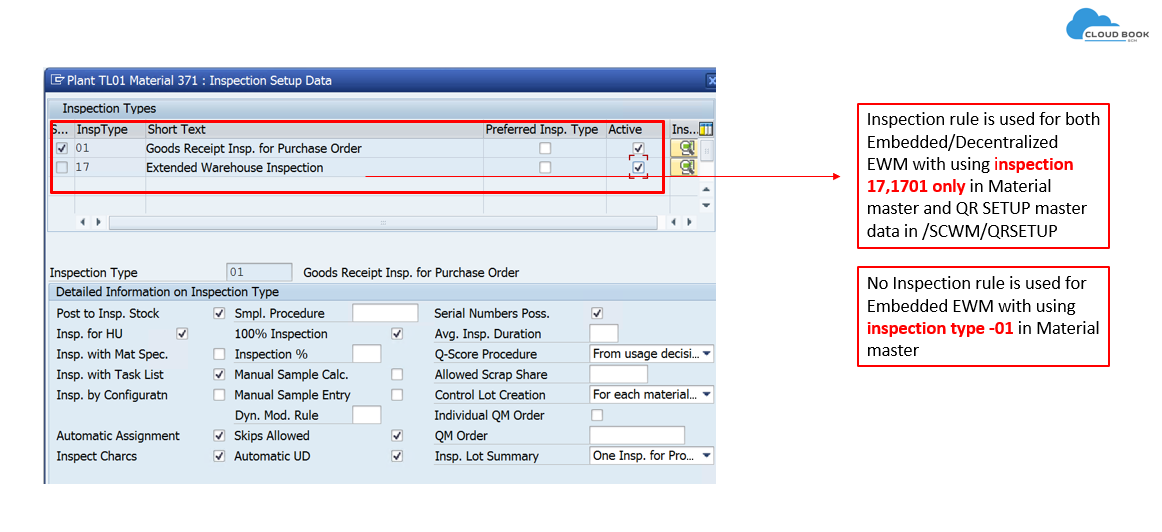
Inspection Type 17 – Extended Warehouse Management Inspection
Inspection Type 17 is specifically designed for EWM-managed inspection processes and is supported in both:
-
Embedded EWM
-
Decentralized EWM
When Inspection Type 17 is used:
-
The inspection process is triggered within the EWM system during inbound processing.
-
Inspection lot creation is linked with EWM inspection documents and warehouse tasks.
- Use additional master data /N/SCWM/QRSETUP
However, unlike Inspection Type 01, additional configuration is required in EWM.
Become an SAP EWM Expert!
Master warehouse management with our hands-on SAP EWM training. Join SCM-Cloudbook’s expert-led sessions and elevate your career in the warehouse industry.
👉 Connect with us directly: Registration Link
📱 WhatsApp: (wa.link/04d8tw or ✆ +91-9289246569).
📱 For Course content and Free demo: https://wa.me/9764427626
🖱️ SCM-CLOUDBOOK
for more blogs: Cloudbook Blogs: Stay Updated with the Latest News and Insights
