
SAP TM Freight Settlement on Lean Services: What Really Changes Between the Freight Order and MIRO

If you’ve supported TM settlement in production, you know the pattern. The freight order charges look right and the carrier confirms delivery. Then the invoice arrives, and a ₹360 fuel difference blocks a ₹60,000 payment for three weeks. Logistics blames the rate table, finance blames TM, and the carrier blames everyone.
Lean-services-based settlement doesn’t remove that friction by magic. What it gives you is a cleaner document structure: one PO item per charge, a simpler service entry sheet, and a posting model that works with Universal Parallel Accounting. With that structure, variances are easier to isolate, accrue and resolve.
1. The Settlement Chain in 60 Seconds
Before comparing classic and lean, here is the end-to-end chain. Every settlement issue you’ll ever debug sits somewhere on this line.
- Freight agreement → charge calculation: the agreement, calculation sheet, rate tables and scales produce charge lines on the freight order (FO) or freight booking (FB), such as base freight, fuel surcharge, loading and detention.
- freight, fuel surcharge, loading and detention.
- Execution events: loading end, departure, arrival and proof of delivery are reported from EWM, the yard, a driver app, or the carrier via SAP Business Network for Logistics (BN4L).
- FSD created and posted: with lean services, the Freight Settlement Document is created and posted in one step. This can be done from the freight document, from the Monitor Freight Documents for Accrual app, or in batch with /SCMTMS/SFIR_CREATE_BATCH. There is no separate transfer run.
- Service PO and lean SES: both are created automatically when the FSD is posted, with one PO item per charge.
- SES approval: the SES is approved automatically, which posts the accrual (GR/IR).
- Invoice verification: MIRO for a manually entered carrier invoice, the InvoiceRequest_In service for EDI invoices, or ERS self-billing (MRRL).
- Payment: a standard FI-AP payment run.
Where lean services changes things: mainly steps 4–6, which is to say what the PO and SES look like and how cleanly each charge flows through to MIRO.
Detailed process flow by team
The chain above is the summary. The swim lane below shows who does what, including the dispute loop and the follow-up settlement for unplanned charges.
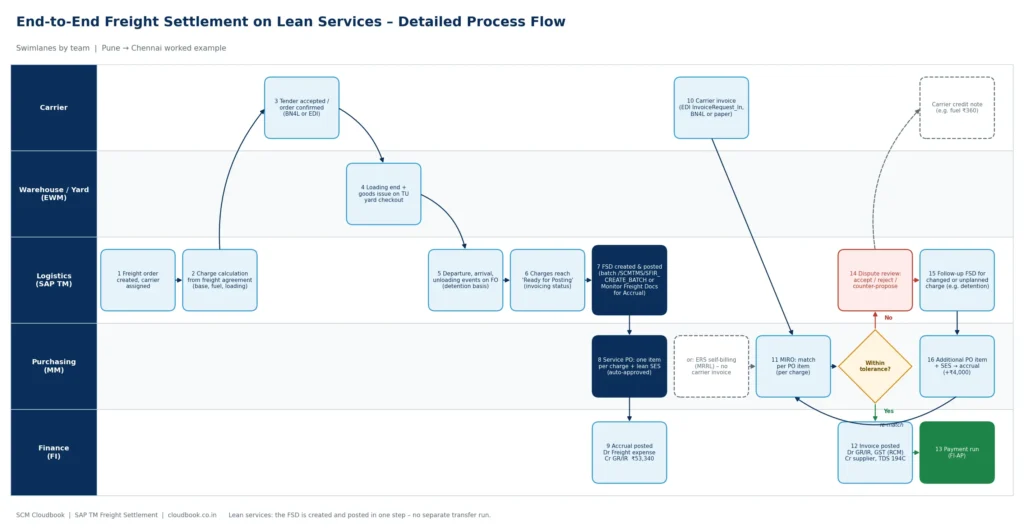
How to read it:
- Planning (steps 1–3): Logistics creates the FO and calculates charges from the freight agreement. The carrier accepts the tender.
- Execution (steps 4–5): the warehouse posts loading end and goods issue on the TU, and yard checkout reports departure. The arrival and unloading timestamps later become the evidence for detention.
- Settlement and accrual (steps 6–9): when the charges reach Ready for Posting, the FSD is created and posted. MM gets a service PO with one item per charge and an auto-approved lean SES, and FI gets the accrual.
- Invoice (steps 10–13): the carrier invoice arrives by EDI, BN4L or paper, or is replaced by ERS self-billing. MIRO matches it per PO item. Within tolerance, the invoice posts (GR/IR clearing, GST under RCM, TDS 194C) and goes to the payment run.
- Dispute loop (steps 14–16): a variance outside tolerance goes to dispute review. A carrier error ends in a credit note. A valid changed or unplanned charge, such as detention, triggers a follow-up FSD, which creates an additional PO item and SES that are then re-matched in MIRO.
2. Classic MM-SRV vs Lean Services: An Accurate Comparison
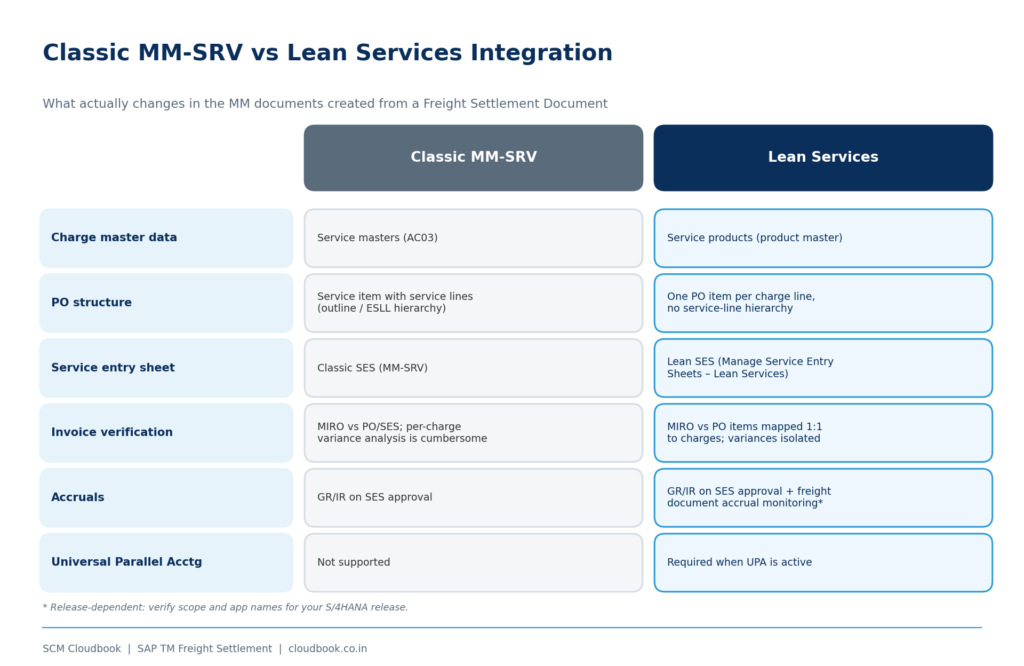
| Aspect | Classic MM-SRV integration | Lean services integration |
| Charge master data | Charge types mapped to service masters (AC03) | Charge types mapped to service products (product master, service product type) |
| PO structure | Service PO item with service lines (outline/ESLL hierarchy) | One PO item per charge line, with no service-line hierarchy |
| Service entry sheet | Classic SES (MM-SRV) | Lean SES (Manage Service Entry Sheets – Lean Services) |
| Invoice verification | MIRO against PO/SES; checking variances charge by charge is cumbersome | MIRO against PO items that map 1:1 to charges, so each variance is visible and can be held or released on its own |
| Accruals | GR/IR posted on SES approval | GR/IR posted on SES approval, plus accrual monitoring for freight documents (release-dependent) |
| Universal Parallel Accounting (UPA) | Not supported | Required when UPA is active |
| Strategic direction | Compatibility path | SAP’s go-forward integration |
3. Worked Scenario: Pune → Chennai FTL, 32 ft MXL
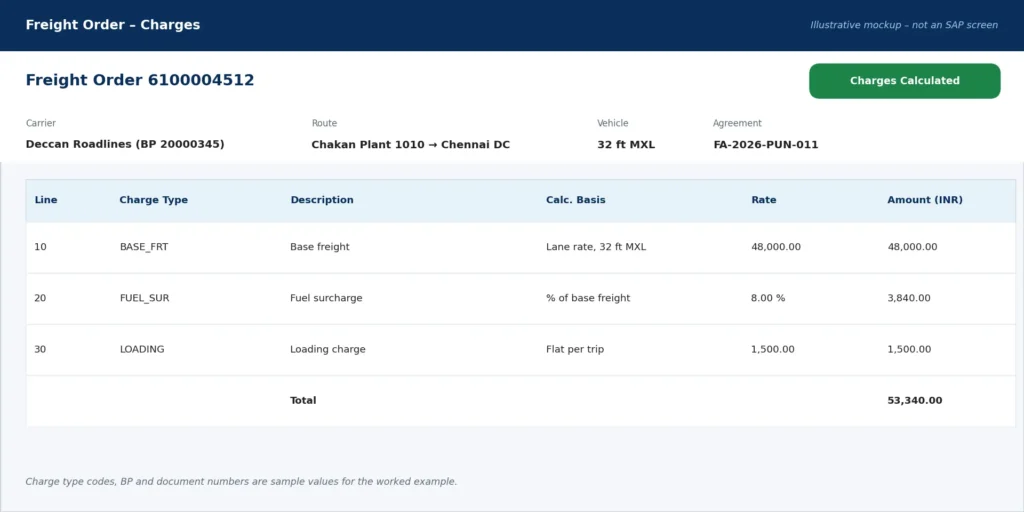
A manufacturer ships finished goods from its Chakan plant to a distributor in Chennai. The freight agreement with the carrier produces these planned charges:
| Charge type | Basis | Planned (FO) |
| Base freight | Lane rate, 32 ft MXL | ₹48,000 |
| Fuel surcharge | 8% of base (diesel index slab) | ₹3,840 |
| Loading charge | Flat per trip | ₹1,500 |
| Total planned | ₹53,340 |
Step 1: Execution events arrive
EWM posts goods issue, and the yard checkout at Chakan reports Departure on the FO. At Chennai, Arrival is recorded, but unloading only starts two days later because the distributor’s dock was full.
What happens next depends on your calculation sheet:
- If it has a time-based detention charge fed by event timestamps, TM calculates detention = 2 days × ₹2,000 = ₹4,000 as an additional charge.
- If it doesn’t, detention becomes a manual unplanned charge, which is exactly where disputes are born.
Step 2: FSD creation and transfer
Once the three original charges reach Ready for Posting, an FSD is created and posted in one step. This automatically creates:
- a PO with three items (base, fuel and loading), each mapped to its service product and account assignment;
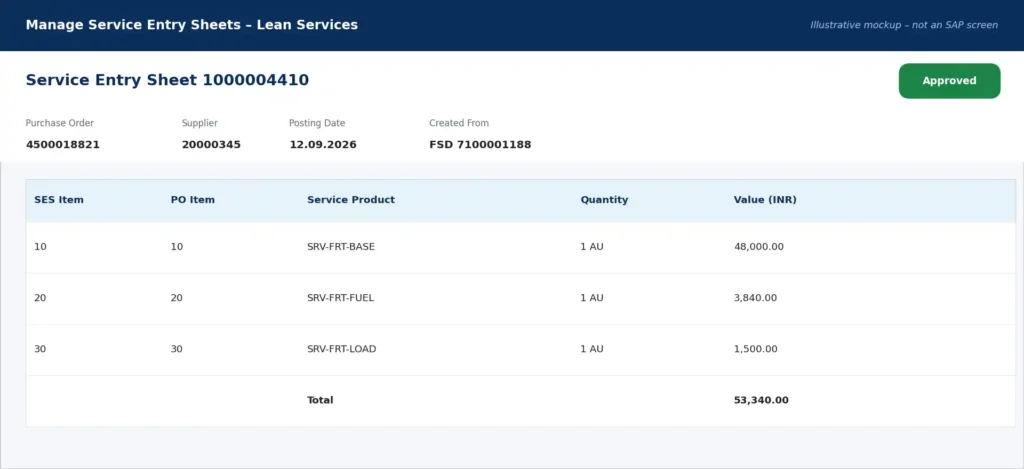
- a lean SES, which is then approved.
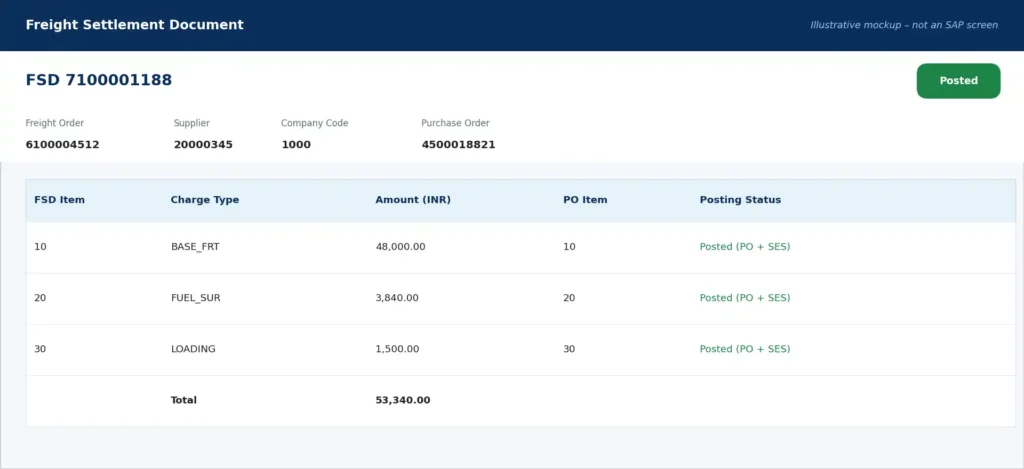
Screen B — FSD 7100001188 after posting: each FSD item points to its own PO item.
Screen C — Lean service PO: one item per charge, each with its own service product, account assignment and G/L account. This is the key difference from classic MM-SRV.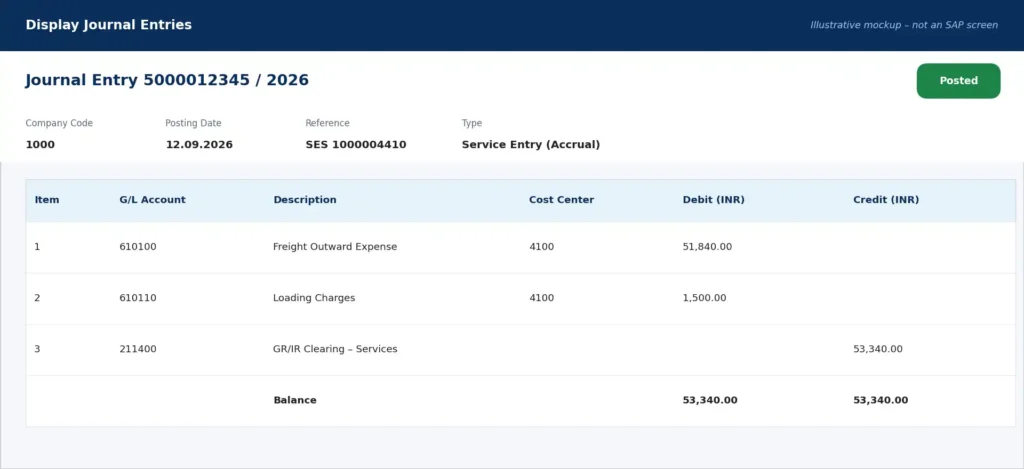
Screen D — Approved lean SES: approving it is what triggers the accrual.
SES approval posts the accrual:
| Account | Dr | Cr |
| Freight Outward Expense (via account assignment, e.g. cost center or profitability segment) | ₹53,340 | |
| GR/IR Clearing | ₹53,340 |
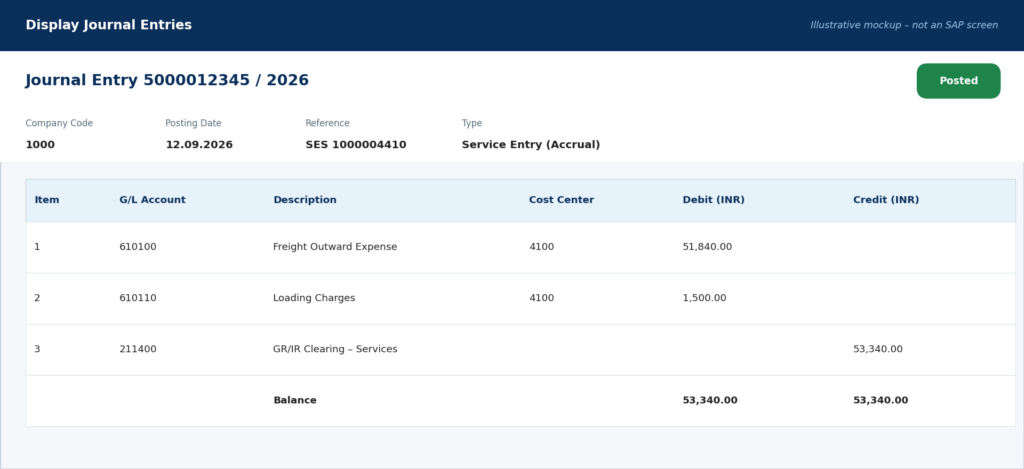
Screen E — Accrual journal entry: freight ₹51,840 and loading ₹1,500 are debited against a GR/IR credit of ₹53,340.
Step 3: The carrier invoice arrives
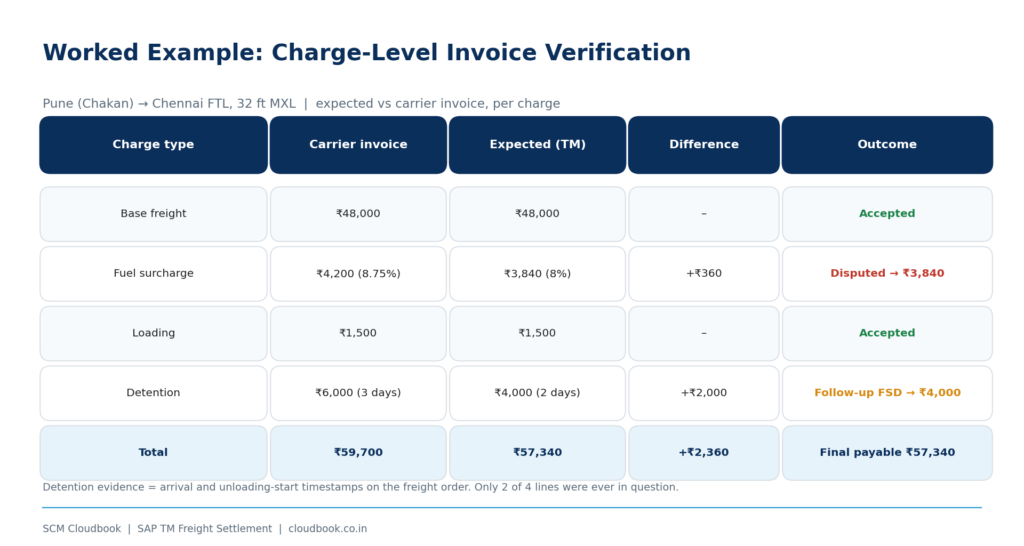
| Charge | Carrier invoice | Expected | Difference |
| Base freight | ₹48,000 | ₹48,000 | – |
| Fuel surcharge | ₹4,200 (billed at 8.75%) | ₹3,840 | +₹360 |
| Loading | ₹1,500 | ₹1,500 | – |
| Detention | ₹6,000 (claims 3 days) | ₹4,000 (events show 2 days) | +₹2,000 |
| Total | ₹59,700 | ₹57,340 | +₹2,360 |
Step 4: Resolution per charge
- Base freight and loading match and go straight through.
- Fuel: the carrier applied last month’s diesel slab. The difference is outside tolerance, so it is disputed, and the carrier agrees to the contract rate of ₹3,840.
- Detention: the arrival and unloading-start timestamps on the FO prove 2 days, not 3. The system-calculated ₹4,000 is settled through a follow-up FSD. That creates an additional PO item and SES, which adds a further ₹4,000 to the accrual.
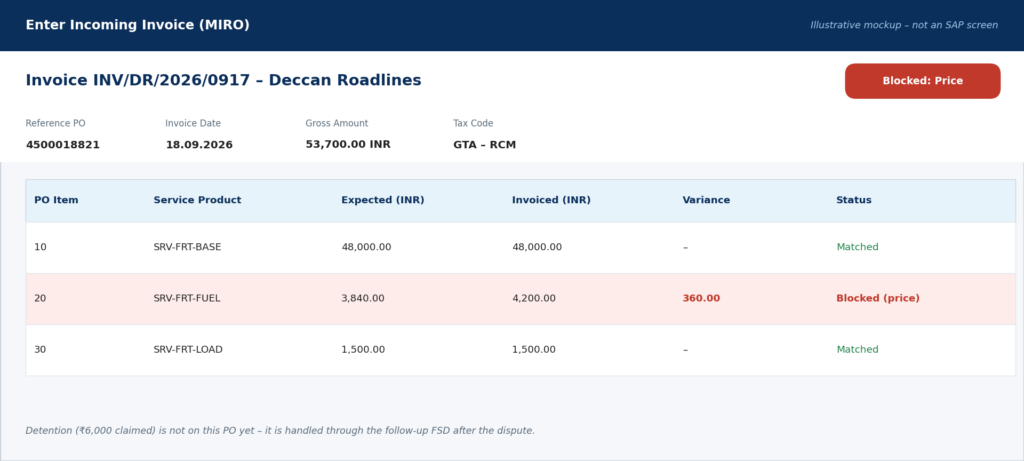
Screen F — MIRO: base freight and loading match, and only the fuel line is blocked for the ₹360 price variance.
Final payable: ₹57,340. Only two of the four charge lines were ever in question, and the evidence came from the freight order’s own execution data.
💬 Pause and think: On your project, is detention calculated by the system from events, or keyed in manually by the transport team? What does that mean for audit? Share your setup in the comments.
4. Planned, Accrued, Actual: Keep Three Numbers Apart
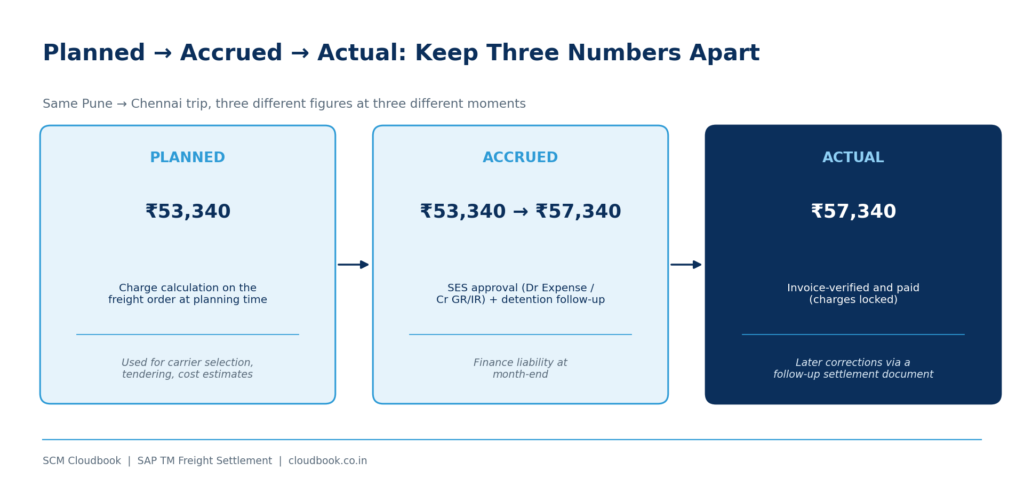
Most “planned vs actual” confusion comes from mixing up three different numbers:
- Planned cost is what charge calculation puts on the FO/FB at planning time (₹53,340 in the example). It drives carrier selection, tendering and transportation cost estimates.
- Accrued cost is what finance has recognized as a liability through SES approval. In the example that was ₹53,340, rising to ₹57,340 after the detention follow-up.
- Actual cost is the amount that was invoice-verified and paid (₹57,340).
What “locked” means: once charges are invoice-verified, the settled FSD should not be changed. Any later correction goes through a follow-up settlement document, whether it’s a credit, a debit, or a newly discovered charge. Note one important difference from classic: with lean services, the change process strategy in Define Settlement Profile is not used. The system decides the change process from the nature of the change to each charge line (see Flexibility in Freight Charge Changes in SAP Help).
Cross-process point (CO/MM): where the cost lands matters as much as the amount.
- Outbound freight: cost distribution can push freight costs down to delivery or sales order item level for margin analysis.
- Inbound freight: TM-calculated costs can flow into the MM purchase order as delivery costs, so they end up in inventory valuation.
A wrong mapping here doesn’t cause a posting error. It silently distorts product profitability, which makes it the most dangerous kind of error.
5. Accruals: FSD-Driven vs Execution-Driven
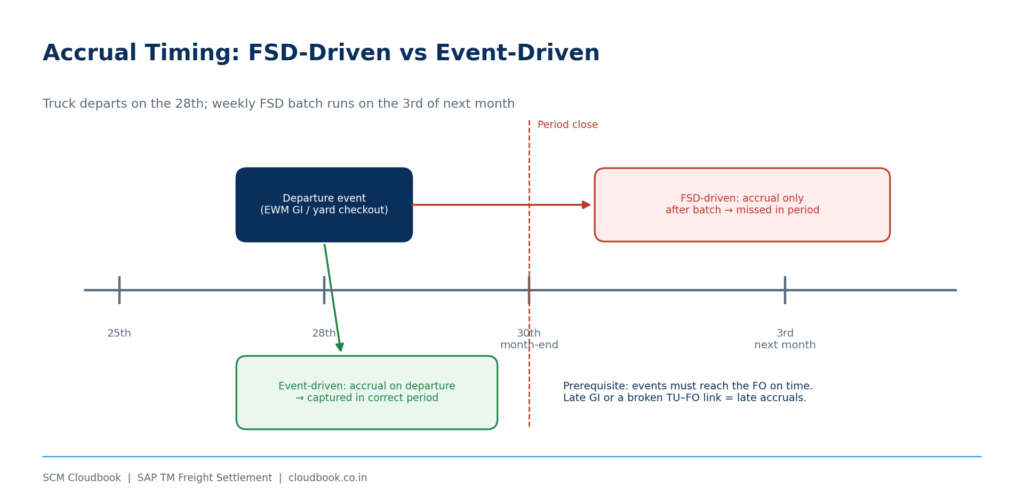
Traditional approach: the accrual is posted when the FSD is transferred and the SES approved. The weakness is timing. If FSDs are batch-created weekly, a truck that left on the 28th may not be accrued at month-end.
Execution-driven approach: the accrual is tied to an execution event, typically departure. The reasoning is that once the truck has left, the service is being consumed and the liability exists. Recent releases add accrual monitoring for freight documents to support this. Verify the app names and scope for your release in the SAP Fiori Apps Reference Library.
The prerequisite nobody mentions in the demo: this only works if events actually reach the freight order.
- On an EWM-integrated site, goods issue on the transportation unit (TU), or yard checkout, must set the FO execution status reliably.
- If warehouse users post goods issue a day late, or the TU–FO link is broken, your accruals will be late too.
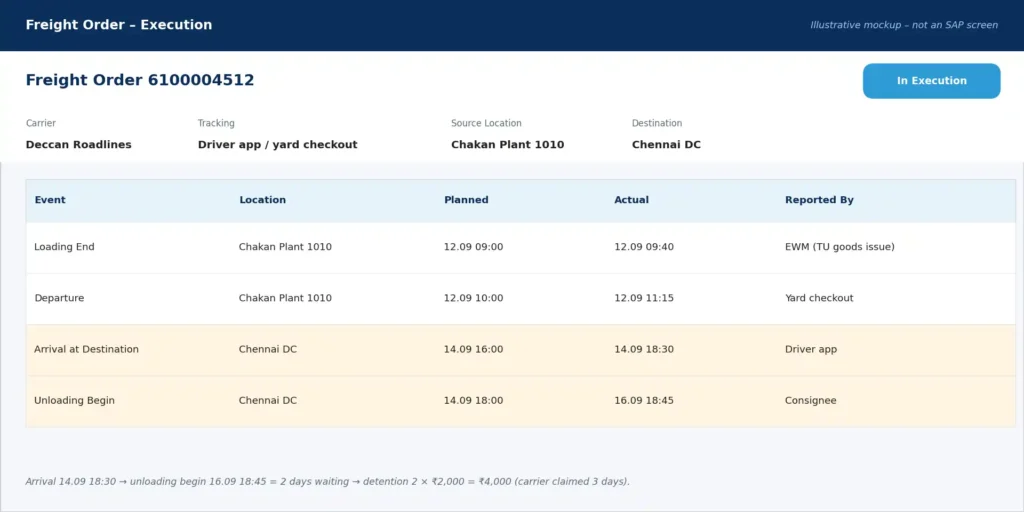
Screen G — Execution events: the Departure event drives the accrual timing, and the Arrival and Unloading Begin timestamps prove the 2-day detention.
In practice, a month-end accrual problem is often a warehouse execution discipline problem.
6. Collective Settlement: When to Use It and What Bites
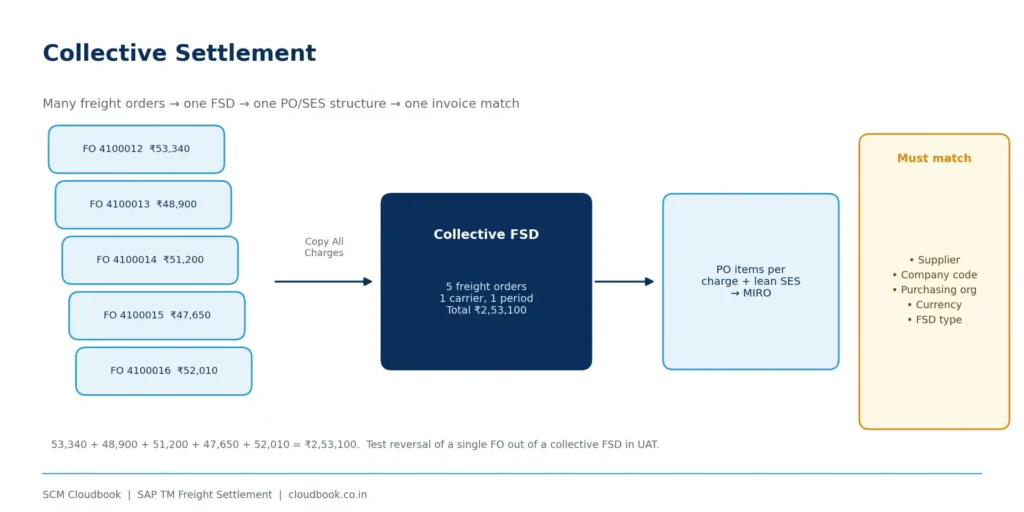
Collective settlement groups multiple freight orders for the same carrier into one FSD. You then get one PO/SES structure and a single invoice match. It suits high-volume domestic road freight, such as a carrier running 200 trips a month on fixed lanes.
Watch these points:
- Grouping rules: the freight documents in one collective FSD must share the same supplier, company code, purchasing organization, currency and settlement document type. Mixing any of these is the most common reason collective creation fails.
- Charge handling: charges must be copied from the source documents, not recalculated. The usual setting is the settlement profile’s calculation option “Copy All Charges”, so the FSD reflects exactly what was agreed on each FO.
- One disputed trip: lean services lets you isolate the disputed charge items. Still, agree upfront with finance whether partial payment of a collective invoice is acceptable.
- Reversals are heavier: reversing one FO out of a collective FSD needs a clear process. Test it in UAT, not in production.
- Carrier alignment: the carrier’s invoice granularity, whether a monthly statement or per trip, should match your collective period.
7. Self-Billing vs Carrier Invoice, and Where Disputes Live
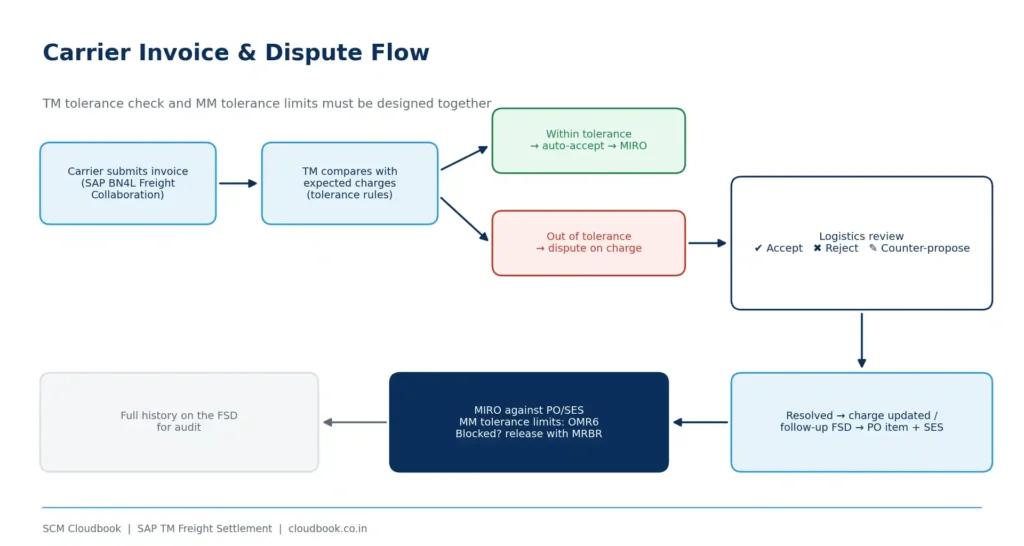
Self-billing (ERS): the shipper settles based on its own calculated charges using MRRL. The carrier can view the settlement and dispute it through collaboration. This works best when agreements are clean and charges are predictable.
Carrier invoice submission: the carrier submits an invoice against freight documents, and TM compares it with the expected charges using tolerance rules. Differences within tolerance can be auto-accepted. Anything beyond tolerance goes to a dispute that logistics reviews, where they can accept, reject or counter-propose.
Channel: SAP Business Network for Logistics (Freight Collaboration) is the strategic channel for carrier invoicing and disputes. Many projects still run older collaboration portal setups, but that is not the future direction.
MM-side safety net: even after TM has accepted an invoice, MIRO still applies the MM tolerance limits configured in OMR6. Blocked invoices are released with MRBR. Design the TM tolerances and MM tolerances together. Otherwise you get invoices that TM accepted and MM blocked, and nobody knows why.
8. India-Specific Touchpoints (Most Blogs Skip These)
GST on GTA services: road freight from a Goods Transport Agency (GTA) is typically taxed under reverse charge (RCM), unless the GTA opts for forward charge. That choice decides whether the tax code on your PO and in MIRO carries RCM self-assessment or input tax credit on the invoice. The tax code must be determined correctly on the PO created from the FSD; a wrong tax code here is one of the most frequent MIRO issues on Indian implementations. Confirm the current rates and each transporter’s option with your tax team rather than hardcoding assumptions.
TDS under Section 194C: payments to transporters attract TDS at 1% for individuals/HUFs and 2% for others. Transporters owning ten or fewer goods carriages can be exempt if they furnish a declaration with their PAN. The withholding tax type and code must be maintained on the carrier’s business partner, so coordinate this with FI.
Business partner hygiene: the carrier BP must be extended as a supplier to the right company code and purchasing organization, with GSTIN and withholding data maintained. A missing extension shows up as an FSD transfer error, not as a vendor master error, which makes it easy to misdiagnose.
9. Configuration Checklist
- Activate the lean services integration: Transportation Management → Settlement → Freight Settlement Integration for Settlement Posting (Service Procurement – Lean Services). It can be controlled system-wide or selectively, for example by company code or carrier. Existing classic customers can migrate selectively.
- Map charge types to service products and maintain the purchasing information: purchasing organization, purchasing group, PO document type and account assignment category.
- Set up account determination from the service product’s valuation class to the G/L account. Test every charge type, not just base freight.
- Define FSD types, settlement profiles and calculation profiles, including calculation options such as Copy All Charges and number ranges. Assign the FSD type to the freight order type (Freight Order Management → Freight Order → Define Freight Order Types). Remember that the settlement profile’s change process strategy is not used with lean services.
- Configure execution events so the events that drive accruals are set up on the FO type and actually reported from EWM, the yard or the carriers.
- Design tolerances and disputes as one set: TM invoice tolerances, dispute handling and MM tolerance limits (OMR6).
- Set up tax and withholding: tax code determination for GTA scenarios, and withholding tax on the carrier BP.
10. Troubleshooting: Symptom → Likely Cause → Where to Look
| Symptom | Likely cause | Where to look |
| FSD transfer fails with “purchasing organization could not be determined” | Purchasing info or org assignment missing for the charge or org unit | Purchasing information customizing; FSD posting log; SLG1 |
| PO created, but the cost hits the wrong G/L account | Mapping from charge type to service product to valuation class | Product master accounting view; account determination |
| MIRO blocks on small differences | MM tolerance limits are tighter than the TM tolerances | OMR6; blocking reason; release with MRBR |
| Wrong tax code on the freight PO | Tax determination not designed for GTA/RCM | PO tax condition records; tax code setup with FI |
| Month-end accrual missing for trucks that already left | Execution event not reaching the FO (late goods issue or checkout, or a broken TU–FO link) | FO execution tab; EWM TU status; event reporting |
| Collective FSD cannot be created | Mixed supplier, company code, purchasing org or currency; wrong calculation option | Selection criteria; settlement profile |
| Carrier disputes every fuel charge | Diesel index or slab not updated in the rate table | Rate table validity; fuel surcharge calculation rule |
[image: FSD transfer error in the application log]
Screen I — Application log: an FSD transfer fails because the purchasing organization could not be determined.
Note on screens A–I: these are illustrative mockups built on the worked example’s sample data, not captures from an SAP system. Document numbers, codes and message texts are sample values. Before publishing, replace them with captures from the SCM Cloudbook training system, blurring the system ID, client and user names.
11. Try This in Your Sandbox
- Create an FO with three charge types and settle it through lean services.
- Open the resulting PO and confirm there is one item per charge.
- Approve the SES and display the accounting document. Is it posting to the account you expected?
- Add a detention charge after invoice verification and observe how your system creates the follow-up document.
If step 4 behaves differently from what you expected, that’s your settlement profile talking. Drop your observations in the comments.
12. Quick Quiz
- A charge is invoice-verified, and the carrier later raises an extra toll charge. What happens to the original FSD?
- Why can’t a customer with UPA active stay on the classic MM-SRV settlement integration?
- Accruals for trips that departed on the 30th are missing at month-end, even though the FSD batch jobs ran. Name one execution-side cause.
Answers:
- The original FSD stays as settled; the toll is settled through a follow-up settlement document.
- UPA requires the lean-services-based integration.
- Goods issue or checkout was posted late in EWM or the yard, or the TU–FO link is broken, so the departure event never reached the FO.
FAQ
Is lean services mandatory? It is required when Universal Parallel Accounting is active, and it is SAP’s strategic direction. Customers without UPA can stay on classic MM-SRV and migrate selectively. Check the scope for your release before planning.
Does lean services by itself reduce carrier disputes? Not by itself. It makes disputes smaller and more precise, because one bad charge no longer holds up the whole invoice. Fewer disputes come from clean agreements, current rate tables and reliable execution events.
Is this only for road freight? No. It applies across freight order and freight booking types. The benefits are most visible in high-volume domestic road transport.
What is the biggest implementation risk? There are two. The first is the mapping from charge types to accounts, which fails silently and distorts profitability. The second is unreliable execution events, which make accruals late. Neither is purely a TM configuration problem: both need MM, FI/CO and EWM in the same workshop.
Final Thoughts
Freight settlement is where logistics execution becomes a financial fact. The lean-services integration gives TM a cleaner bridge across that gap: one PO item per charge, a simpler SES, UPA compatibility and better variance isolation.
In production, though, the results come from beyond the settlement configuration:
- agreements the carriers actually accept,
- rate tables that are kept current,
- warehouses that report events on time,
- tolerances that finance and logistics have agreed together.
SCM Cloudbook’s SAP TM training covers this full chain, with scenarios drawn from live implementation and support projects. Topics include Freight Order Management, Charge Management, Settlement, and integration with MM, FI/CO and EWM.
🌐 cloudbook.co.in · WhatsApp: wa.link/04d8tw
