
SAP EWM Pick Denial Exception Codes: BIDP vs BIDF vs BPRP vs BFRP Explained
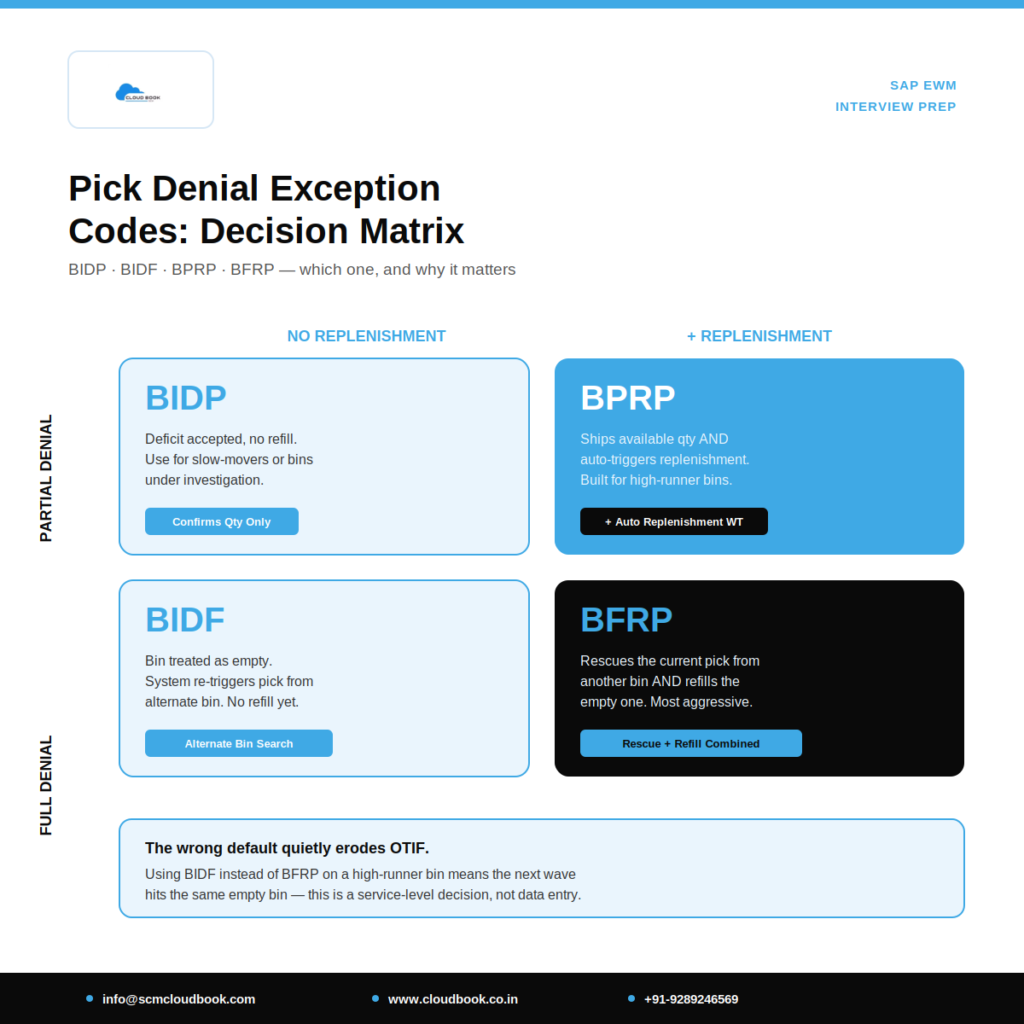
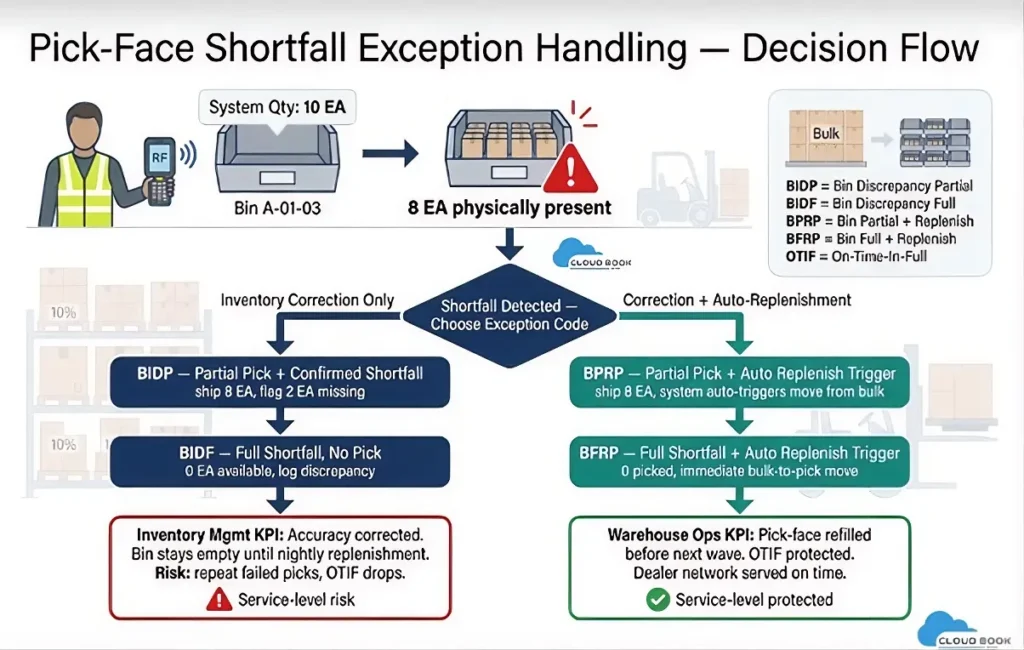
Anyone who has worked an outbound picking wave in SAP EWM knows the moment: the RF screen says pick 10 EA, and the bin has 8. What happens next isn’t just a data-entry choice — it’s a decision that directly affects service level, inventory accuracy, and whether the next wave hits the same wall.
This guide breaks down the four standard SAP EWM pick denial exception codes — BIDP, BIDF, BPRP, and BFRP — using a real-world automotive 3PL scenario, and covers the exact SPRO configuration needed to make each one work correctly.
Why Pick Denial Exception Codes Matter in EWM
In high-velocity distribution centers, system quantity and physical bin quantity drift apart constantly — missed scans, breakage, shrinkage. When a picker can’t fulfil a Warehouse Task (WT) as planned, EWM needs to know two things:
- How much of the shortfall gets confirmed — partial or zero?
- Should the system automatically trigger replenishment, or wait for the next scheduled run?
Choosing the wrong code has real consequences. If a team defaults to BIDF for every stockout instead of BFRP, the pick-face bin sits empty until the next batch replenishment cycle — causing repeated failed picks and eroding OTIF (On-Time-In-Full) performance with downstream customers.
Key takeaway: The right exception code isn’t a technical footnote — it’s a service-level decision that Inventory Management and Warehouse Operations both depend on, since it separates “confirmed shortfall for inventory correction” from “shortfall plus automatic corrective action.”
Business Scenario: Automotive Spare Parts 3PL
Consider a 3PL warehouse storing fast-moving automotive parts — fasteners, gaskets — for multiple OEM clients. Fixed pick-face bins are topped up from bulk/reserve storage, and outbound deliveries feed a JIT (Just-In-Time) dealer network on tight wave timing.
The business needs:
- Partial fulfilment to ship whatever quantity is available, wherever business rules allow it.
- Immediate, autonomous replenishment from bulk storage — no waiting on a nightly batch run.
- A clean audit trail that distinguishes inventory-correction shortfalls from shortfall-plus-corrective-action events.
The four exception codes below are how EWM operationalizes that logic.
The Four Exception Codes Explained
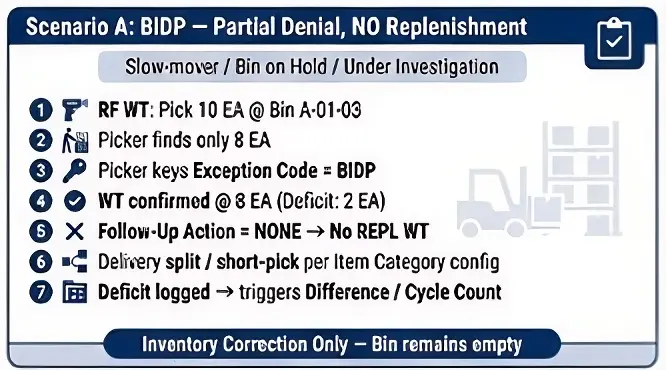
Scenario A — BIDP (Partial Denial, No Replenishment)
Used when a deficit is acceptable and no immediate replenishment is wanted — for example, a slow-mover bin or one under investigation/hold.
Process flow:
- RF screen shows: pick 10 EA, Bin A-01-03.
- Picker physically finds only 8 EA.
- Picker enters Exception Code BIDP instead of a standard confirmation.
- System confirms the WT at 8 EA — a 2 EA deficit is recorded.
- Since BIDP’s Follow-Up Action is “none,” no replenishment WT is created.
- The outbound delivery either splits or ships short, per your Delivery Document Category / Item Category configuration.
- The 2 EA deficit typically triggers a Difference/Cycle Count for the bin, if the Difference Indicator is active.
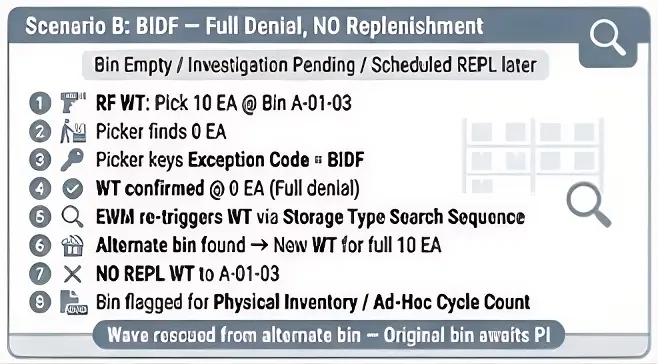
Scenario B — BIDF (Full Denial, No Replenishment)
Used when a bin is effectively empty and the system should look elsewhere immediately — but replenishment shouldn’t fire yet (e.g., it’s scheduled for the next wave, or the bin needs investigation first).
Process flow:
- Picker finds zero stock at Bin A-01-03.
- Picker enters Exception Code BIDF.
- System confirms the WT at 0 EA.
- Because the WT is now fully denied, EWM re-triggers WT creation using the Storage Type Search Sequence, routing the full 10 EA to an alternate pick bin.
- No replenishment WT is generated for the original bin this cycle.
- Bin A-01-03 is typically flagged for Physical Inventory / Ad Hoc Cycle Count.
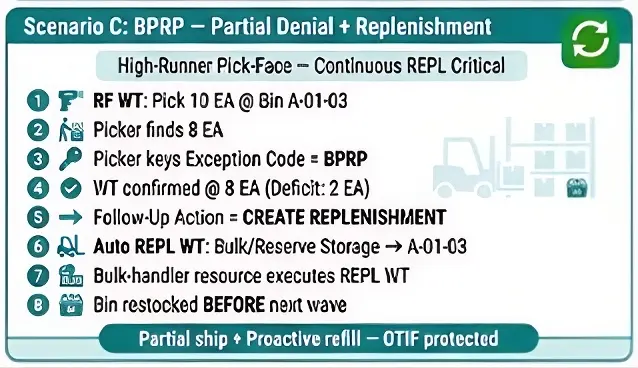
Scenario C — BPRP (Partial Denial + Replenishment)
Used at primary pick-face bins where continuous replenishment is business-critical — the classic high-runner fastener scenario.
Process flow:
- Picker finds 8 of 10 EA.
- Picker enters Exception Code BPRP.
- System confirms the WT at 8 EA; the 2 EA deficit is handled per delivery-split logic.
- Because BPRP’s Follow-Up Action is “Create Replenishment,” the system automatically triggers a Replenishment WT from the assigned Reserve/Bulk Storage Type — typically Order-Based or Min/Max-based, depending on the configured Replenishment Strategy.
- The Replenishment WT is executed by a bulk-handler resource (often a different Warehouse Process Type/Activity Area) and confirmed, restocking the bin ahead of the next wave.
Scenario D — BFRP (Full Denial + Replenishment)
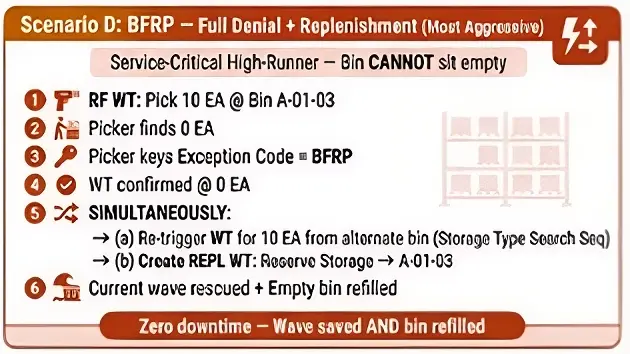
The most aggressive combination, reserved for critical high-runner bins that can’t be allowed to sit empty.
Process flow:
- Picker finds zero stock.
- Picker enters Exception Code BFRP.
- System confirms the original WT at 0 EA.
- The system does two things simultaneously:
- Re-triggers WT creation for the full 10 EA from an alternate bin (same mechanism as BIDF), keeping the current wave moving.
- Creates a Replenishment WT to refill the original bin from Reserve Storage.
- Result: the current pick is rescued from another bin, and the empty bin is proactively refilled — purpose-built for fast-moving, service-critical pick faces.
Quick Comparison
| Code | Confirmed Qty | Replenishment Triggered? | Alternate Bin Used? | Best For |
|---|---|---|---|---|
| BIDP | Partial | No | No | Slow movers, bins under hold |
| BIDF | Zero | No | Yes | Bins pending scheduled replenishment |
| BPRP | Partial | Yes | No | Business-critical fast movers |
| BFRP | Zero | Yes | Yes | Critical high-runner pick faces |
Key Configuration & Master Data Requirements
1. Exception Code Definition (Core Config)
SPRO Path: SCM Extended Warehouse Management → Extended Warehouse Management → Cross-Process Settings → Exception Handling → Define Exception Codes
For BIDP, BIDF, BPRP, and BFRP, these fields drive the behavior:
- Exception Code — the key itself, typically client-specific rather than SAP-standard delivered.
- Confirmation Number / Deficit Indicator — determines whether the system confirms partial or zero quantity.
- Follow-Up Action / Process — controls whether a Replenishment WT is auto-created.
- Difference Indicator — controls whether a stock difference/cycle count is triggered for the source bin.
- Valid for Process — scopes the code to Picking, GR, or Putaway.
2. Warehouse Process Type (WPT) Assignment
The exception code list must be assigned to the relevant Warehouse Process Type (e.g., the PICK process type) so it’s selectable during RF confirmation for that task type.
Path: EWM → Goods Issue Process → Picking → Define Warehouse Process Type (check the Confirmation Control settings link).
3. Storage Type Search Sequence (Critical for BIDF/BFRP)
SPRO: EWM → Master Data → Storage Bin → Activity Areas / Storage Type Search
This sequence determines which alternate storage type/bin EWM checks next when a full denial (BIDF/BFRP) forces WT re-creation. Make sure the pick-face storage type isn’t re-selected in a loop, and that reserve/bulk storage is correctly positioned as the fallback.
4. Replenishment Configuration (Critical for BPRP/BFRP)
SPRO: EWM → Goods Issue Process → Replenishment → Define Replenishment Movement Types / Control
- The Replenishment Strategy on the Storage Bin/Storage Type master data must support Order-Based Replenishment for exception-driven REPL WTs to fire — not just planned Min/Max background runs.
- Replenishment Quantity (Min/Max or Fixed) must be maintained on the storage bin master; otherwise the system has no target quantity to replenish to.
FAQ
What’s the difference between BIDF and BFRP in SAP EWM? Both fully deny the original Warehouse Task and re-source the pick from an alternate bin via the Storage Type Search Sequence. The difference is replenishment: BIDF does not trigger a Replenishment WT for the depleted bin, while BFRP does — refilling it automatically from reserve storage.
When should I use BPRP instead of BIDP? Use BPRP at business-critical, high-runner pick faces where the bin must be refilled immediately after a partial shortfall. Use BIDP for slow-movers or bins under hold/investigation, where you want the deficit recorded but no automatic replenishment.
Does the exception code affect inventory accuracy reporting? Yes. The Difference Indicator on each exception code determines whether a stock difference or cycle count is triggered for the source bin, which is how these events feed into inventory accuracy KPIs separately from pick-face service-level KPIs.
Are BIDP, BIDF, BPRP, and BFRP standard SAP-delivered codes? No — these are typically client-specific exception codes configured to a customer’s naming convention in SPRO under Exception Handling, not SAP-standard delivered codes out of the box.
Final Thoughts
Knowing the theory behind exception codes is only the starting point. Real SAP EWM expertise comes from understanding how configuration, business process design, and day-to-day warehouse operations intersect — that’s what separates answering interview questions from solving live production issues under wave-pressure.
SCMCloudbook offers structured SAP EWM training from Basic through Advanced and Super Advanced L3 — covering MFS, ASRS, Labour Management, EWM ABAP, DAS, and Cartonization — alongside Transportation Management (TM) and Materials Management (MM) courses built around real implementation and support scenarios.
🌐 Learn more at cloudbook.co.in
SCM-Cloudbook: Gateway to Expert SAP Training & Updates
for Quick enquiry ping on WhatsApp : wa.link/04d8tw
