
SAP EWM MFS Inbound Process Flow: How PLC and EWM Talk to Each Other
Warehouse automation ultimately comes down to one thing: how well SAP EWM communicates with the shop-floor PLC.
SAP EWM’s MFS layer acts as the real-time bridge, turning a Warehouse Task into an actual movement on conveyors, stacker cranes, or Transfer Cars (TCART).
Let’s follow an inbound HU journey—from the Goods Receipt conveyor all the way to the final storage bin—and see how this communication works step by step.
SAP EWM MFS: What Really Happens When an HU Moves from Point A to Point B
Every automated movement inside a warehouse — however simple it looks on the floor — triggers a chain of SAP EWM MFS (Material Flow System) activities running in parallel with the PLC (Programmable Logic Controller). This post walks through the complete, end-to-end background process that fires when a single Handling Unit (HU) moves from Bin A to Bin B, covering every EWM keyword, configuration object, and telegram exchange involved.
1. Two Layers, One Movement: Logical EWM vs. Physical Sub-System
Every automated HU movement runs on two parallel layers:
- Logical layer (inside SAP EWM): A Warehouse Order (WO) generates a Warehouse Task (WT). The WT tells the system the HU must move from Bin A → Bin B, and this movement is tracked against Communication Point A (CP A) and Communication Point B (CP B) — the logical mapping of physical conveyor/crane positions inside EWM.
- Physical layer (the sub-system): The actual conveyor, crane, AGV, or robot physically carries the HU from Conveyor A → Conveyor B (or crane position to crane position) on the shop floor, controlled entirely by the PLC.
The MFS layer sits exactly between these two worlds — it’s the translator that keeps the logical EWM Bin/CP status and the physical conveyor/crane status in sync in real time
2. The 6-Stage MFS Lifecycle
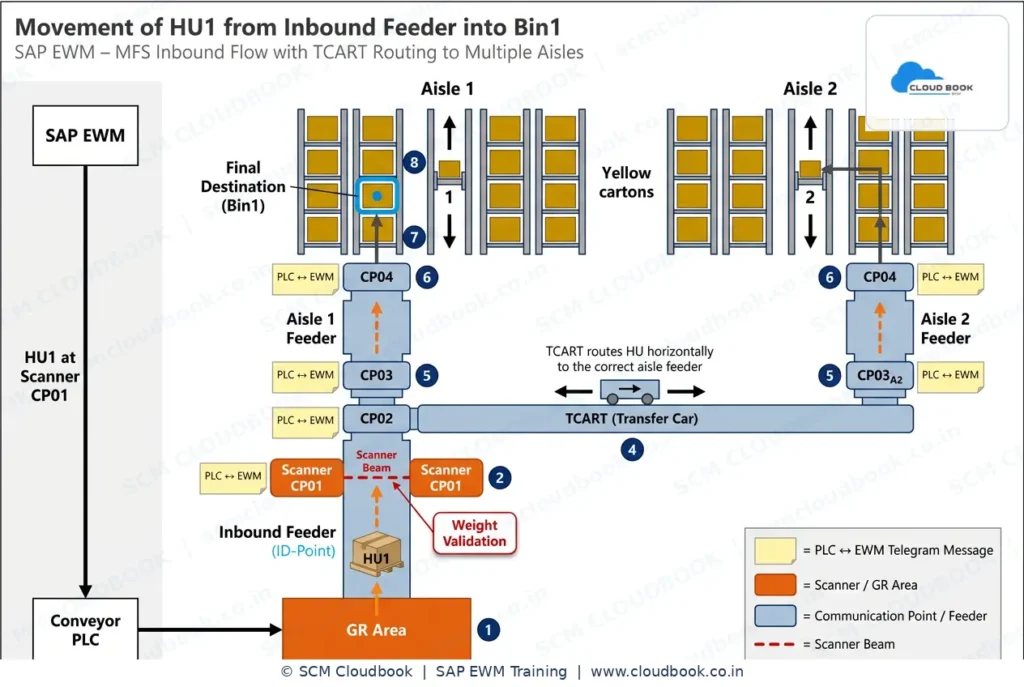
1. HU Arrival & Identification
HU1 reaches Communication Point CP01 (the ID-Point). A barcode scanner and a weight-validation beam capture the HU number and confirm physical presence — this is the trigger event, not yet an EWM message.
2. PLC Processing
The PLC reads the scanner input, checks its local logic table, and compiles a telegram — a fixed-structure character string containing the HU ID, CP number, and status flags.
3. Telegram to SAP EWM
The PLC pushes this inbound telegram to SAP EWM MFS through the configured communication channel — typically an RFC connection via SAP Plant Connectivity (PCo), or a direct TCP/IP socket using function modules like /SCWM/MFS_TELEGRAM_RCV on the EWM side.
4. EWM Validation & Routing
EWM’s Programmable Logic Controller Interface (PLC-I) validates the HU against an open Warehouse Task, checks the Resource and Layout Master, and calculates the next destination — here, TCART routes HU1 horizontally to Aisle 1’s feeder.
5. Physical Movement
EWM sends a destination telegram back via /SCWM/MFS_TELEGRAM_SND. The PLC drives CP02 → CP03 → CP04, moving HU1 up the Aisle 1 feeder toward Bin1.
6. Confirmation & Next Move
A downstream sensor at each CP confirms arrival, firing a confirmation telegram. EWM updates the Warehouse Task status and the cycle repeats until HU1 reaches Bin1 (step 8) — the final destination.
3. Step-by-Step: The Full A → B Lifecycle
Here is the exact sequence, mapped to both the SAP EWM/MFS side and the PLC side:
On the SAP EWM/MFS side:
- Warehouse Task creation in MFS Storage (Storage Type Role J — the role that flags a storage type as MFS-controlled).
- MFS Queue determination during WT creation, based on the Activity Area assigned to the movement.
- Determination from the WT Queue — the Queue simultaneously resolves two things: (a) the PLC responsible, and (b) the Resource (crane, AGV, robot, conveyor segment).
- Telegram interface message is triggered from SAP EWM MFS to the PLC — a structured message carrying HU, source CP, and destination CP data.
- Handshake with PLC — EWM waits for the PLC’s acknowledgment before considering the instruction “sent.”
On the PLC side:
- Telegram message received from SAP EWM MFS.
- Acknowledgment sent back to SAP EWM MFS confirming receipt — this closes the “instruction” handshake loop.
Physical execution (still PLC-driven):
- Task assigned to the physical resource based on the Resource captured in the WT (crane / AGV / robot / conveyor).
- Material flow executed — the actual physical transfer, Conveyor A → Conveyor B, or crane pick-and-place at the destination bin.
- WT confirmation message triggered back to SAP EWM MFS once the physical move completes.
- Handshake with PLC initiated again — this time for confirmation, not instruction.
Back on the SAP EWM/MFS side (closing the loop):
- Telegram message received from PLC (the confirmation telegram).
- Acknowledgment sent to PLC.
- WT confirmed in SAP EWM — the Bin status updates from Bin A to Bin B, the HU’s logical location in EWM now matches its physical location, and the Warehouse Order can move to the next step or close out.
5. Why the Double Handshake Matters
Notice the pattern repeats twice — once for the instruction telegram (EWM → PLC) and once for the confirmation telegram (PLC → EWM). This double handshake is what gives SAP EWM MFS its reliability: no movement is ever assumed complete on a “fire and forget” basis. Every telegram sent expects an acknowledgment, and every physical completion expects a confirmation telegram back — this is the core design principle that makes EWM automation safe for high-throughput, 24×7 automated warehouses.
6. Telegram Anatomy: What Language Does It Actually Speak?
MFS telegrams aren’t XML or JSON — they’re fixed-length or delimited ASCII character strings, structured into segments (telegram type, CP number, HU/material number, quantity, status code). SAP EWM parses these using the PLC-I (PLC Interface) customization in /SCWM/ transactions, mapping each segment to internal fields. The transport layer is typically:
- RFC (via PCo) — most common for SAP-certified conveyor/ASRS controllers, using standard function modules for send/receive.
- TCP/IP socket — used when a third-party PLC (Siemens, Rockwell) communicates directly, often through a middleware layer that converts telegram strings into RFC calls EWM understands.
7. Error Handling & Exceptions
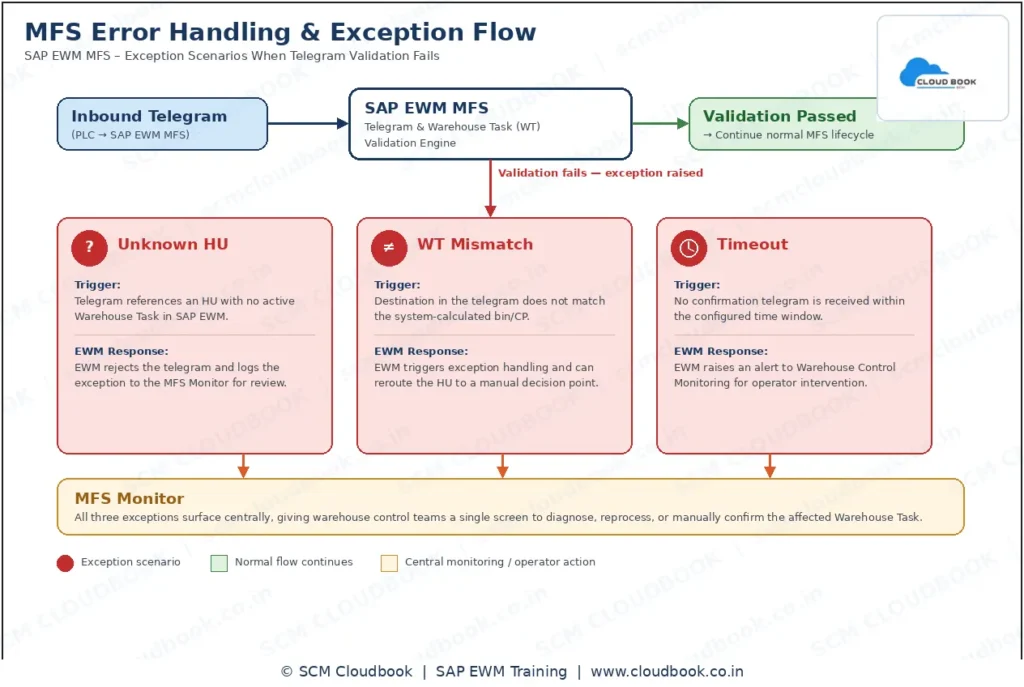
Real warehouses aren’t ideal-path only. EWM MFS must handle:
- Unknown HU — telegram references an HU with no active WH Task; EWM rejects and logs to the MFS monitor.
- WT Mismatch — destination in the telegram doesn’t match the calculated bin; triggers exception handling and can reroute to a manual decision point.
- Timeout — no confirmation telegram within the configured window; EWM raises an alert for warehouse control monitoring.
8. Conveyor MFS vs. ASRS: Same Framework, Different Physics
The 6-stage lifecycle is identical in principle for an Automated Storage and Retrieval System (ASRS), because both sit under the same EWM MFS/PLC-I framework. The difference is in the Resource type and telegram payload:
- A conveyor telegram carries HU + CP data along a linear/horizontal path (as in our TCART example).
- An ASRS stacker crane telegram additionally carries X/Y/Z coordinates or aisle-rack-level-bin addresses, since the crane must be told a 3D storage position, not just a routing direction. Confirmation telegrams also report crane-specific states (fork extended, load picked, load deposited).
So ASRS isn’t a different architecture — it’s the same PLC-I/telegram engine handling a richer, coordinate-based payload and additional resource states.
9. Business Benefits
Real-time PLC-EWM integration delivers sub-second HU visibility, eliminates manual putaway confirmation, reduces mis-routes through system-validated Warehouse Tasks, and gives supply chain teams a single source of truth for automated inbound flow — critical for high-throughput DCs running 24×7.
10. FAQ
Q1: What triggers MFS Queue determination? It happens automatically during Warehouse Task creation, based on the Activity Area linked to the movement.
Q2: What is Storage Type Role “J” in EWM? It’s the role assigned to a storage type to flag it as MFS-relevant, meaning tasks in that storage type are routed through the Material Flow System rather than standard RF.
Q3: How many telegrams are exchanged for one HU movement? Minimum four: instruction telegram (EWM→PLC), instruction acknowledgment (PLC→EWM), confirmation telegram (PLC→EWM), and confirmation acknowledgment (EWM→PLC).
Q4: What resources can an MFS Queue route to? Cranes, AGVs, robots, and conveyor segments — defined via the MFS Resource Type customizing node.
Q5: What protocol does SAP EWM MFS use to talk to a PLC? Most commonly RFC via SAP Plant Connectivity (PCo); direct TCP/IP sockets are used with third-party controllers via middleware.
Q6: What language/format is an MFS telegram written in? It’s a structured character string (fixed-length or delimited), not XML/JSON — parsed field-by-field using EWM’s PLC-I customization.
Q7: Is the process different for ASRS vs. conveyor systems? No — same 6-stage lifecycle and telegram framework. ASRS telegrams simply carry coordinate-based (X/Y/Z or bin-address) payloads instead of linear CP routing data.
Q8: Where can I learn SAP EWM MFS configuration hands-on? SCMCloudbook’s EWM Advance session covers MFS Queue setup, Communication Point/Channel configuration, and live telegram monitoring — built by practitioners for practitioners, making it one of the best institutes for EWM training in India.
Want to master SAP EWM MFS and automation end-to-end? Explore SCMCloudbook’s EWM Advance session — built by practitioners, for practitioners.
www.cloudbook.co.in
For queries, connect on WhatsApp: wa.link/04d8tw
Blogs :SCM-Cloudbook: Gateway to Expert SAP Training & Updates
