
SAP TM Ocean Freight E2E
SAP TM Ocean Freight Process: Architecture, Configuration, and Where Standard Falls Short
Every consultant who has configured an ocean freight scenario in SAP TM has hit this moment: the design looks clean in the fit-gap workshop, and then somewhere between Freight Unit (FU) creation and carrier settlement, reality shows up as a two-day schedule deviation and a demurrage charge nobody built a Charge Type for.
This is a peer-level walkthrough of a door-to-door FOB ocean export scenario — the shape of engagement that touches almost every SAP TM implementation with an international trade footprint — covering the business scenario, the two standard solutioning patterns, the underlying configuration objects, and the limitations that surface only after go-live.
The Business Scenario: Shipper-Managed Ocean Export with LSP Handoff
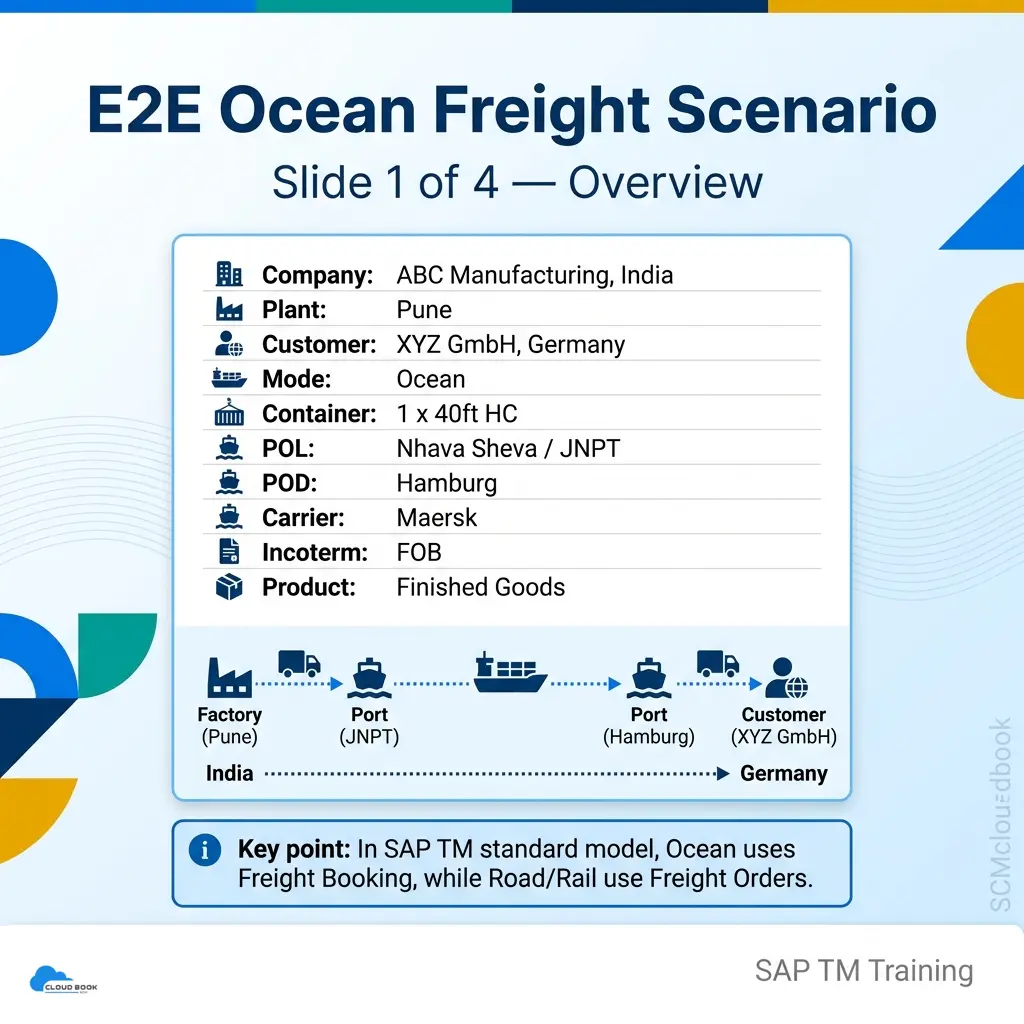
Enterprise context:
- Shipper: ABC Manufacturing, India (Plant: Pune)
- Consignee: XYZ GmbH, Germany
- Product: Finished Goods
- Mode: Ocean, FCL
- Equipment: 1 x 40ft High Cube
- Port of Loading (POL): Nhava Sheva / JNPT
- Port of Discharge (POD): Hamburg
- Ocean Carrier: Maersk
- Incoterm: FOB
Why the Incoterm Drives the Design, Not Just the Contract
Under FOB, ABC Manufacturing’s cost and risk responsibility technically ends once the container is loaded on board at JNPT. In practice, most Indian exporters continue managing the full door-to-door movement in SAP TM for shipment visibility and to protect their own dispatch SLAs — even though the consignee owns freight cost and risk from POL onward. This single fact is the first thing that gets modeled incorrectly on live projects, because it drives Charge Management and Freight Settlement Document (FSD) design far more than it affects the physical transportation network.
The Three-Leg Transportation Network
- Pre-carriage (Road): Pune Plant → JNPT
- Main carriage (Ocean): JNPT → Hamburg
- On-carriage (Road): Hamburg Port → XYZ GmbH, Germany
This three-leg shape is what forces a genuine architectural decision in SAP TM — not just a configuration exercise.
Business pain points this scenario must solve:
- Independent carrier and rate management per leg (road forwarder ≠ ocean carrier)
- Consolidated, auditable freight cost visibility across all three legs for margin analysis
- Milestone-driven exception handling when ocean schedules deviate
- Clean FI/MM settlement without manual invoice reconciliation
A mistake I see constantly with junior consultants: they set the FUBR split criteria around trade lane and equipment type, test it against one happy-path order, and move on. Then a partial shipment comes through with mixed Incoterms on the same delivery, and the FU splits in a way nobody predicted — because the Fixation Strategy on the building rule wasn’t actually locking what they thought it was locking.
Test your FUBR against messy, real order combinations before you sign off. Not the clean demo data.
Master Data You Actually Need Before Any of This Works
- Locations for Pune plant, JNPT, Hamburg port, and the ship-to — each with the right location role assigned, not just copied from a template
- Business Partners for Maersk and your road forwarders, carrier/forwarding-agent BP roles set correctly
- Vessel and truck resources, plus your 40ft HC equipment group
- Trade lane / zone master supporting whatever lane logic your FUBR is grouping on
Two Standard Solutioning Patterns in SAP TM
Most enablement content shows a single flow and moves on. In practice, you are choosing between two legitimate patterns built on the same underlying BOPF (Business Object Processing Framework) business objects — and the choice has downstream consequences for planning, execution, and settlement for the life of the implementation.
Solution A — Leg-Based Model (Independent Freight Order and Freight Booking)
The demand document — an OTR (Order-based Transportation Requirement) or DTR (Delivery-based Transportation Requirement), both built on BOPF business objects such as /SCMTMS/TOR — is consolidated into a Freight Unit (FU). Transportation Planning then splits the FU into three independent execution documents:
- A Road Freight Order (FO) for pre-carriage (Pune → JNPT)
- A Freight Booking (FB) for the ocean main leg (JNPT → Hamburg) — not a Freight Order, since SAP TM’s standard object model routes ocean and air legs through Freight Booking, while road and rail remain Freight Order-based
- A Road Freight Order for on-carriage (Hamburg → consignee)
Each leg carries its own resource, carrier, tendering, and cost assignment — the pattern most enterprise networks land on, because it maps directly onto how forwarders and 3PLs structure their own contracts.
Best fit: multi-carrier networks, 3PL-heavy operations, and any scenario where pre-carriage/on-carriage carriers are independent of the ocean carrier and require separate tendering and settlement.
Solution B — Single Freight Order with Transportation Stages
Instead of three documents, the FU plans onto a single door-to-door Freight Order carrying internal Stages — pre-carriage, main-carriage, on-carriage — each with its own means-of-transport and resource assignment under one governing document ID.
This simplifies end-to-end status tracking, but the trade-off surfaces fast: because ocean legs are natively Freight-Booking-based in the standard object model, representing a true ocean stage inside a single Freight Order typically requires an NVOCC-style configuration or a workaround at the FUBR and Transportation Planning Profile level — something that looks trivial in a workshop and becomes a genuine design conversation once you’re inside the building rule configuration.
Best fit: simpler networks with fewer carrier handoffs, or where a single forwarder/NVOCC contractually owns the full movement.
Architectural recommendation: Solution A wins on most enterprise engagements the moment independent carrier relationships exist per leg — the settlement story is materially cleaner. Solution B earns its place only when the network is genuinely simple enough that a single document, single owner is the more accurate representation of the commercial relationship.
Detailed Process Flow: SAP TM Ocean Freight Execution
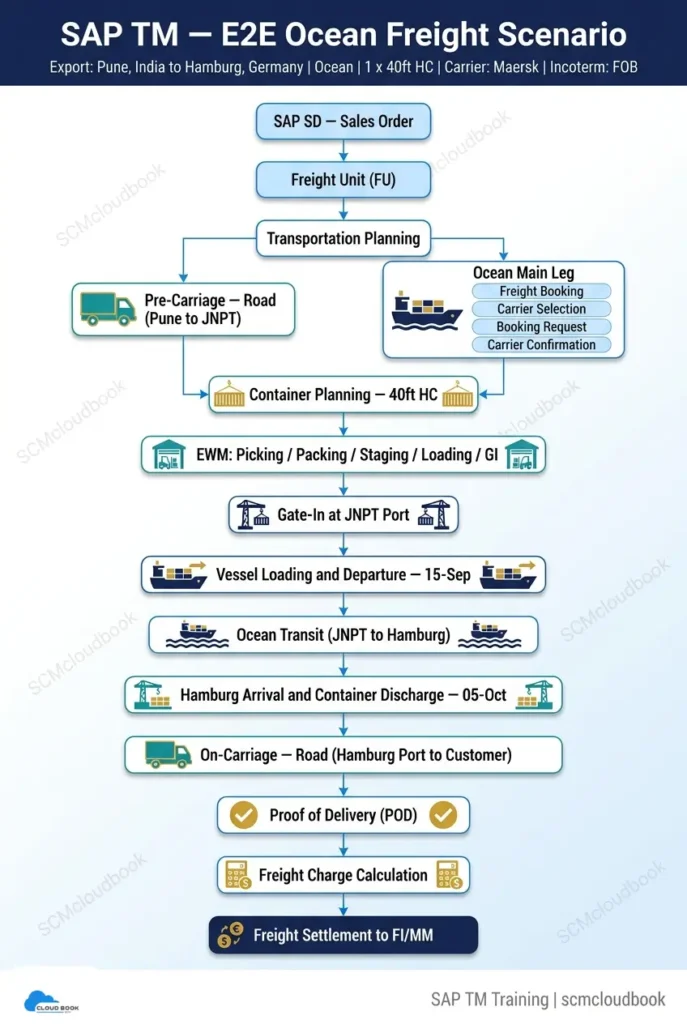
Demand Capture and Freight Unit Building
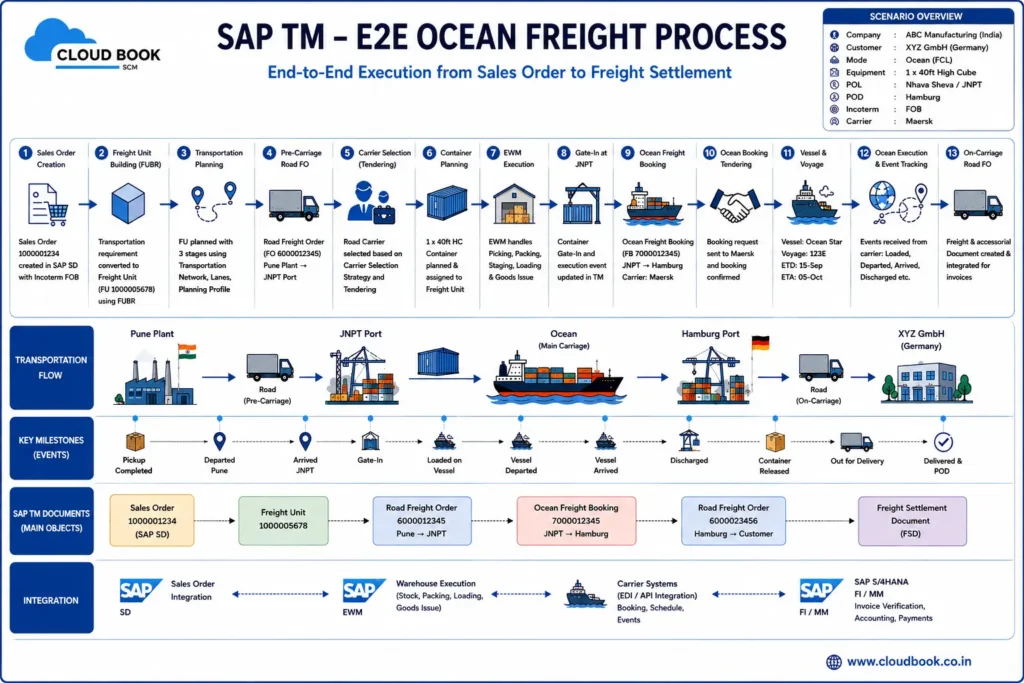
- SAP SD Sales Order created for XYZ GmbH, triggering the transportation requirement (OTR/DTR)
- Freight Unit (FU) generated automatically via the Freight Unit Building Rule (FUBR) — consolidating by trade lane, equipment type, and Incoterm
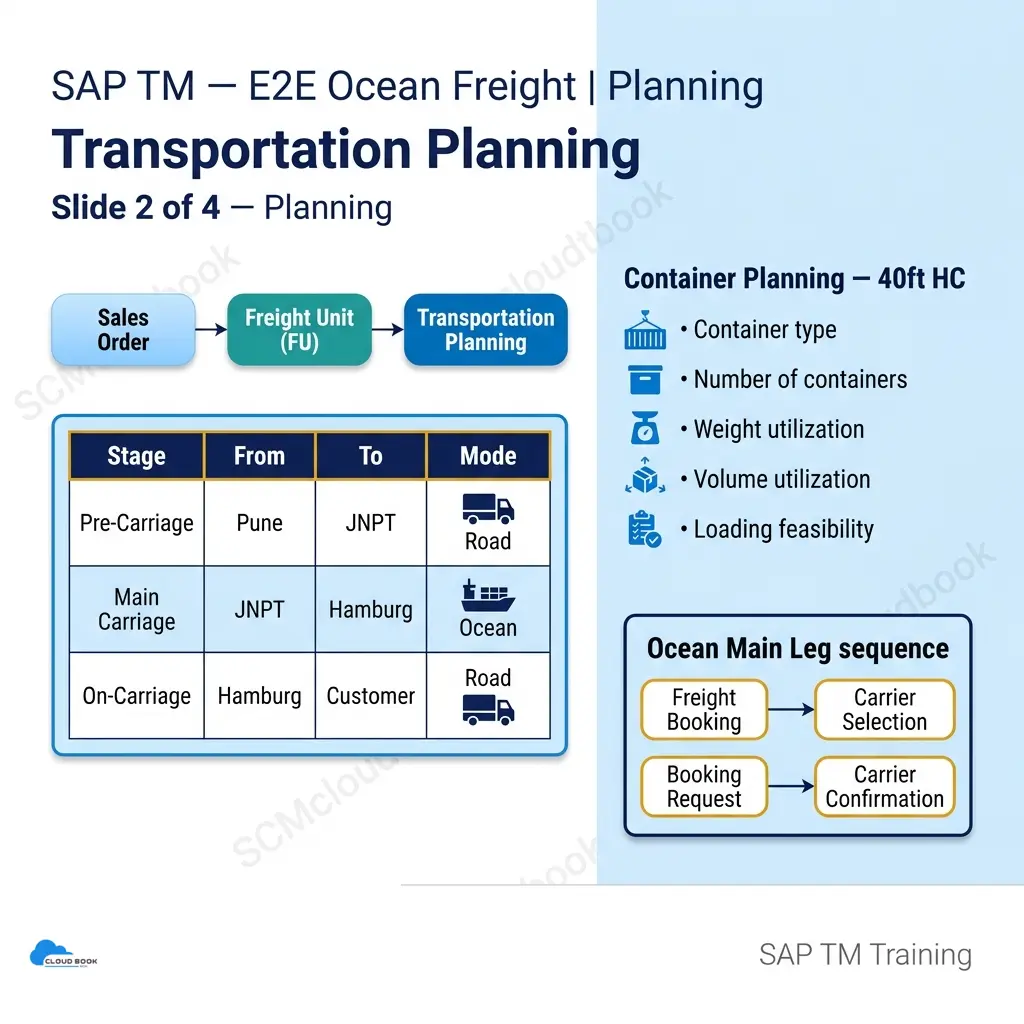
- Transportation Planning executes the FU split across pre-carriage, main-carriage, and on-carriage legs, governed by the Transportation Planning Profile
Pre-Carriage Execution
- Road Freight Order created (Pune → JNPT); carrier tendered and confirmed via standard tendering (broadcast/successive) or Freight Procurement if strategic carrier contracts are in scope
- Container Planning for 1 x 40ft HC — equipment, weight/volume utilization, and loading feasibility validated, optionally supported by the SAP TM Optimizer (VSR — Vehicle Scheduling and Routing) if load consolidation is active
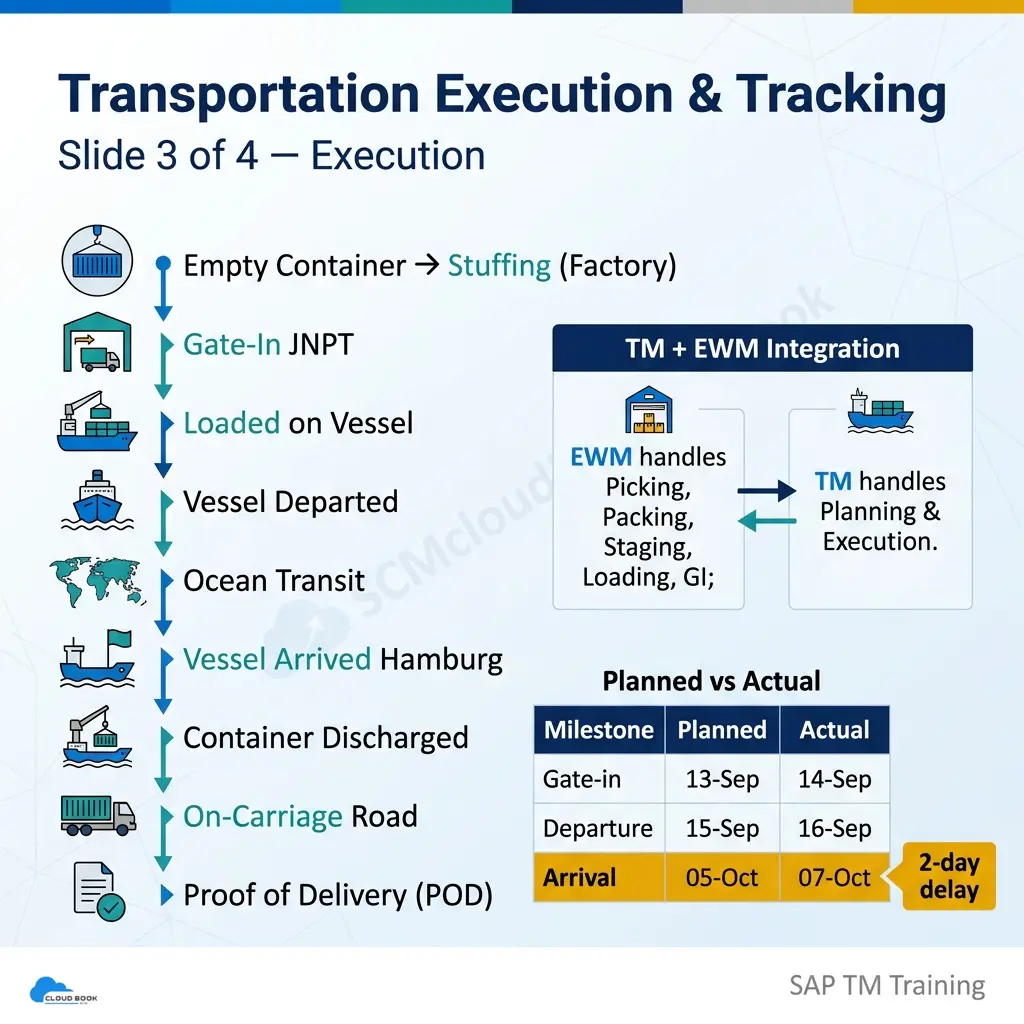
- EWM executes picking, packing, staging, loading, and goods issue at the Pune plant — via ASR (Advanced Shipping & Receiving) if EWM and TM are co-deployed on the same S/4HANA instance, noting ASR currently supports Road Freight Orders only
- Gate-in at JNPT captured as a milestone event
Main Carriage — Ocean Booking and Track & Trace
- Freight Booking created — booking request transmitted to Maersk via EDI/API; carrier confirms vessel, voyage, and ETD/ETA
- Vessel loading and departure milestone updated (planned vs. actual — e.g., planned 13-Sep, actual 14-Sep)
- Ocean transit tracked via Track & Trace milestones where carrier integration exists; PPF (Post Processing Framework) actions can trigger alert output (email/Fiori notification) on milestone deviation
- Vessel arrival and container discharge at Hamburg — planned-vs-actual variance frequently compounds here (a 1-day gate-in delay can surface as a 2-day arrival delay)
On-Carriage and Settlement
- On-carriage Road Freight Order created (Hamburg Port → XYZ GmbH)
- Proof of Delivery (POD) captured at the consignee site
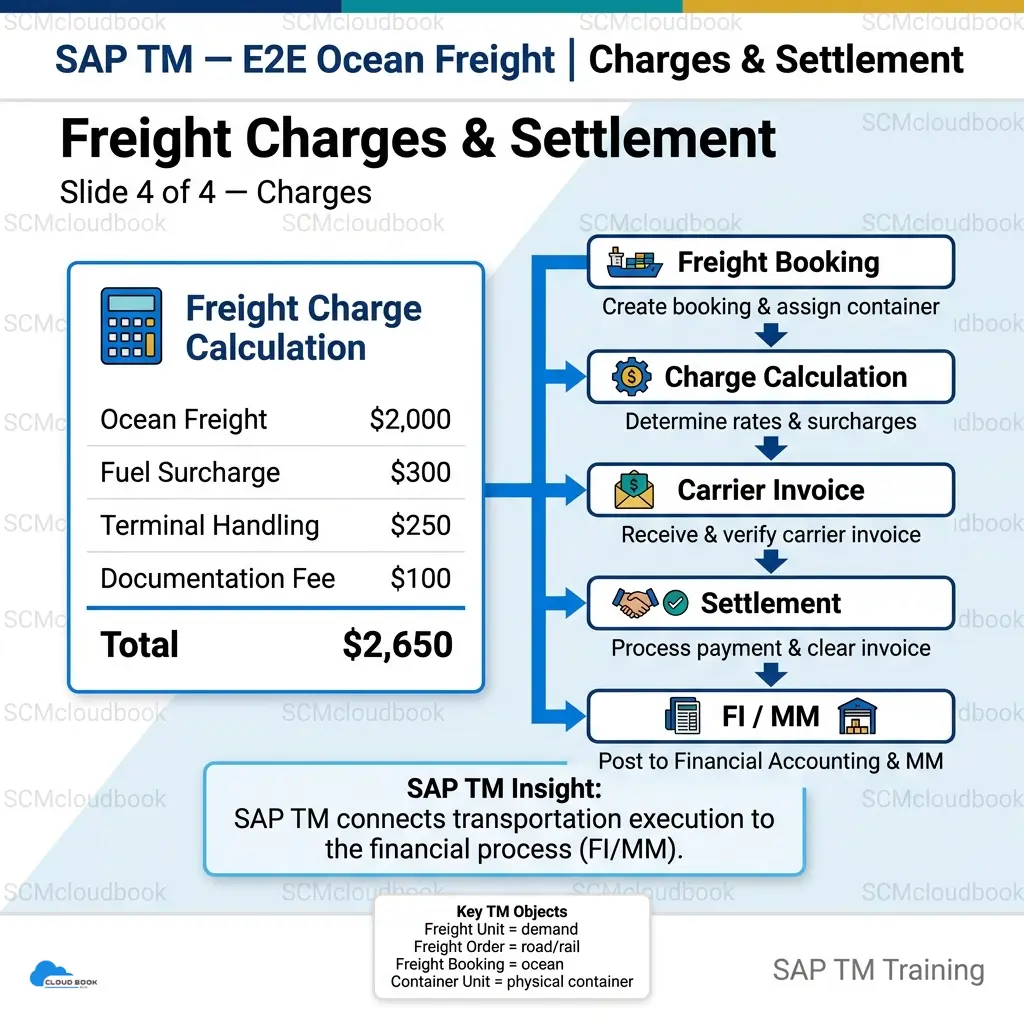
- Freight Charge Calculation executes across all three legs plus ancillary charges (fuel surcharge, terminal handling, documentation fee), driven by the Transportation Charge Calculation Sheet (TCCS)
- Freight Settlement Document (FSD) consolidates charges and posts to FI/MM for vendor invoicing and cost accounting
Configuration Architecture Behind the Scenario
Master Data Prerequisites
- Locations: Pune plant, JNPT, Hamburg port, XYZ GmbH — each configured as TM Locations with the correct location role (plant, port, ship-to)
- Business Partners: carrier (Maersk) and forwarding agents configured with the relevant BP roles (carrier, forwarding agent)
- Resources: vessel and truck resource types, plus equipment groups (40ft HC container type)
- Trade Lane / Zone master: origin and destination zones supporting the FUBR’s lane-based grouping logic.
Planning Configuration
- Freight Unit Building Rule (FUBR): governs how demand consolidates into FUs by trade lane, equipment, and Incoterm — and determines Freight Order vs. Freight Booking object-type assignment per leg
- Transportation Planning Profile: controls leg splitting and carrier/resource proposal logic
- Freight Order types (Road) vs. Freight Booking types (Ocean): configured as distinct object types with different status profiles — Freight Booking carries carrier-specific fields (vessel, voyage) that a Freight Order does not
- Optimizer settings: planning profile parameters for load consolidation, routing constraints, and cost-based carrier selection where the VSR Optimizer is in scope
Charge Management and Carrier Settlement (TCM)
- Charge Types and calculation profiles per leg — ocean freight, fuel/BAF surcharge, terminal handling (THC), documentation fee — each a distinct charge element on the Transportation Charge Calculation Sheet
- Rate tables / scales tied to trade lane and equipment type
- Currency and exchange rate handling — carrier invoices in USD/EUR settled against an INR-denominated internal cost view, with exchange rate type and date fixed in config rather than left to system defaults
Charge Management: This Is Where Projects Actually Go Sideways
I’d rather talk about Charge Management for an extra ten minutes in blueprint than spend three weeks post-go-live reconciling invoices. Every time I’ve skipped that conversation, I’ve regretted it.
Standard setup gets you ocean freight, fuel/BAF surcharge, THC, and documentation fees as clean Charge Types sitting on your Calculation Sheet, tied to rate tables scaled by lane and equipment. Fine. That part works exactly like the training material says it does.
What the training material doesn’t cover: demurrage and detention. There’s no out-of-box Charge Type waiting for you. If your carrier contract has free-day terms — and it almost always does — you need to model that deliberately, usually as a custom charge element with its own Scale Base, or you’ll end up eyeballing every delayed shipment’s invoice by hand.
A related trap: Incoterm doesn’t automatically restrict what TM settles. The system will happily calculate and post charges across all three legs whether or not that matches who’s contractually paying for what. Under FOB, your shipper’s liability ends at load-on-board — but unless your Calculation Sheet and settlement routing actually reflect that, you’ll get a technically perfect Freight Settlement Document that doesn’t match the commercial reality anybody agreed to.
Settlement and Cross-Module Integration
- Freight Settlement Document (FSD) consolidation rules — how multiple charge elements across three legs roll into one settlement object, with the ability to route each leg to a different vendor
- FI/MM integration — PO-based settlement (service entry sheet, three-way match) or PO-less direct FI posting, decided at the Charge Management configuration level
- GTS integration, where in scope — compliance and sanctioned-party screening executed against the Freight Booking/Order before release for the border-crossing leg
- PPF-driven output management — carrier tender documents, booking confirmations, and exception alerts all routed through Post Processing Framework actions rather than custom code
Settlement Routing, Briefly
Each leg can settle to a different vendor — road forwarder on one end, Maersk in the middle, road forwarder on the other. Your FSD needs to route accordingly, and whether you’re doing PO-based settlement with a service entry sheet or going PO-less depends on how FI/MM was scoped going in. Get this alignment wrong between FUBR granularity and charge profile granularity, and you won’t find out until UAT — not during config review, when it’s cheap to fix.
Where Standard SAP TM Stops Helping : The Stuff That Only Shows Up After Go-Live
A few things I’ve learned the expensive way, across more than one project.
Milestone Data Is Only as Good as the Carrier Integration Behind It
Without a live EDI/API connection to the ocean carrier, “vessel departed” and “container discharged” milestones require manual updates. Standard SAP TM does not ship a predictive ETA engine — planned-vs-actual variance only reflects reality if someone updates it, or if carrier track-and-trace integration or SAP’s broader visibility tooling has been layered on separately.
EWM Visibility Stops at the Plant Gate
If EWM is in the landscape, its execution scope — picking, packing, staging, loading, goods issue — covers the pre-carriage leg only. On ASR, EWM-TM integration currently supports Road Freight Orders exclusively, not Ocean Freight Bookings, meaning the ocean leg is a pure TM-side object with no EWM warehouse counterpart. This is correct standard behavior, but it consistently surprises teams who assume EWM tracks the container through to the destination port.
Charge Reconciliation Against the Carrier Invoice Is Rarely a Clean Match
Standard Charge Types cover the planned elements — ocean freight, fuel surcharge, THC, documentation. Demurrage, detention, and per-diem charges arising from real-world delays typically aren’t modeled until a project has already absorbed an unreconciled invoice once. Scope these as a Charge Management design conversation up front — via a custom Charge Type or a BRFplus-driven calculation rule — not as a post-go-live fix.
Incoterm-Driven Cost Ownership Isn’t Automatic
SAP TM will calculate and settle charges across all three legs regardless of Incoterm. It is the design’s responsibility to ensure the Charge Calculation Sheet and FSD routing reflect that, under FOB, the shipper’s cost responsibility ends at load-on-board — otherwise the settlement document is technically correct and commercially wrong.
Multi-Leg Cost Reporting
Multi-leg cost visibility for margin reporting — if finance wants cost-per-leg breakdowns — needs to be designed into your FSD consolidation logic on purpose. It doesn’t fall out of the standard flow for free.
None of this means standard SAP TM can’t handle ocean freight well. It handles it fine. What it doesn’t do is protect you from skipping the design conversations that these gotchas require. That’s still the consultant’s job.
Closing Architectural Perspective
The ocean freight scenario is one of the most instructive patterns in SAP TM precisely because it forces every core object to interact at once — Freight Unit, Freight Booking vs. Freight Order, EWM handoff via ASR, Charge Management, and Freight Settlement. Get the leg-based-versus-stage-based decision right at design time, and the remainder is disciplined configuration. Get it wrong, and the Charge Management model gets redesigned six months after go-live, under production pressure.
This level of project-tested architectural detail — not just the transactions, but where the standard process genuinely bends — is what we build into SCM Cloudbook’s SAP TM and EWM training.
🌐 Website: https://cloudbook.co.in 📚 SAP Blogs: https://cloudbook.co.in/blog/ 📩 Email: info@scmcloudbook.com
TM self pace learning – Transport Management – Consulting
Ping on WastApp : wa.link/04d8tw
